Juicer X / Twitter Aggregator
X / Twitter Social Wall and Aggregator
How the X (Twitter) aggregator works
Today, it is a lot harder to convince someone to do business with you solely with branded content. People want authentic testimonials and stories to prove your products and services work. There is no better way to market your company than customer-generated content that sells your brand, and a social media aggregator helps bring it all together.

Juicer’s X – Twitter aggregator lets you embed an X – Twitter feed directly onto your own website. Visitors are introduced to your social side without having to leave your site and log in to X – Twitter!
A snazzy, up-to-date X – Twitter feed on a product page can help decrease bounce rates and improve conversions. Let your existing followers and customers turn skeptics into believers by giving them genuinely fresh testimonials every day.
X (Twitter) aggregator for education
X (Twitter) aggregator for food and hospitality
X (Twitter) aggregator for marketing agencies
X – Twitter aggregator for e-commerce allows potential customers to see what others are posting about your products without having to navigate away from your website. For example, putting an X – Twitter aggregator on a Shopify product page not only gives potential customers more information but yet another reason to stay on your website longer. Juicer helps improve conversions and dwell time.
Benefits of an X (Twitter) social wall
Stream fresh reviews effortlessly
Boost engagement and time on site
Amplify social proof and credibility
Seamless brand consistency
Turn browsers into customers
Enhanced SEO benefits
A dynamic X feed adds fresh, regularly updated content to your website. Search engines value new content and engagement signals, helping improve dwell time, increase organic visibility, and strengthen your site’s overall SEO performance.
How to set up X (Twitter) aggregator to embed X (Twitter) posts on your website
1
Sign up for Juicer’s X (Twitter) aggregator (it’s free!)
Input your email address and select a password, then click “Sign up for a free account”, or choose one of the social network options to sign up with.
2
Select X (Twitter) social media icon
After you’ve signed up, you’ll see a list of social media icons. Click on the X (Twitter) icon.
3
Create Source
Select the type of posts you want to add (Username or Hashtag). Once you click “Add source” Juicer will automatically curate your X (Twitter) posts. Once all of your X (Twitter) content has been curated, you’ll be directed to your feed editor.
4
Embed the X (Twitter) feed on your website
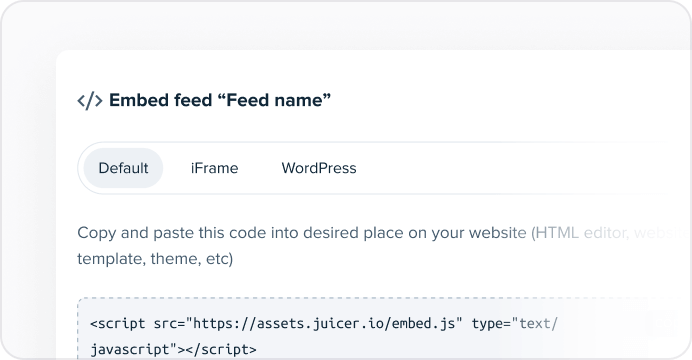
In order to embed the X (Twitter) aggregator on your website, go to the top bar of your feed editor page and click on “Embed”.
You can simply copy and paste this code into your website on any page you would like to feature your Juicer X (Twitter) feed.
Supported platforms
Juicer plans allow as many as 15 source accounts per feed. You can be aggregate and moderate your social wall with feeds from popular platforms like Facebook, Instagram, TikTok, X (Twitter), LinkedIn and many more.
Your beautiful social feed
live in just a few minutes!
1. Connect your social accounts
Link X(Twitter), Google reviews, YouTube, Instagram, Facebook, and other platforms to bring your social content to life. Highlight promotions, vehicle features, behind-the-scenes stories, or event updates.
2. Customize your social media feed
Choose from a range of layouts and add call-to-action buttons for test drives, service bookings, or more. Personalize the design to match your brand for a professional, polished look.
3. Embed the feed on your website
Easily embed your curated feed onto your website using an HTML snippet, iframe, or WordPress plugin, whether it’s a homepage, blog, or dedicated landing page.
Trusted by 5,000+ businesses, big and small


Frequently asked questions
Find answers to common questions about Juicer’s X (Twitter) aggregator.