
Juicer Flickr aggregator
Flickr aggregator for your social wall
With billions of photos, Flickr is a leading platform for photographers and creators. Our Flickr aggregator lets you seamlessly pull images and albums from your account or multiple sources into one clean, unified feed for your website.
Whether you're a photographer, a brand, or an organization, you can embed Flickr content directly onto your site. Keep visitors engaged with fresh visuals and high-quality photography, all while highlighting your creativity and inspiring your audience.

How the Juicer Flickr aggregator works
Flickr is one of the most trusted platforms for sharing high-quality photography and visual storytelling. From professional portfolios to community albums, its content is rich and inspiring but often locked within the platform. With Juicer's Flickr aggregator, you can seamlessly pull images, galleries, or albums from your Flickr account - or multiple sources - into a clean, unified feed displayed directly on your website.
Whether it's showcasing professional photography, curating visual campaigns, or highlighting community contributions, your embedded Flickr feed keeps your site fresh, interactive, and visually engaging - helping you share creativity in context and inspire your audience.

Flickr aggregator use cases
Flickr aggregator for photographers
Showcase your portfolio, albums, or latest photo projects in a beautifully embedded feed. Perfect for photographers who want to extend their reach beyond Flickr and attract more clients or followers.
Flickr aggregator for brands
Display curated visual content from campaigns, product shoots, or lifestyle imagery. Ideal for brands that want to enhance storytelling and connect with audiences through professional-quality images.
Flickr aggregator for communities
Curate photos from members, events, or group projects into one feed. Great for communities, clubs, or organizations that want to celebrate collective creativity and keep their websites engaging.
Benefits of a Flickr social wall

Keep content visually fresh automatically
Juicer updates your feed with the latest photos and albums in real time, ensuring your website always displays fresh, inspiring imagery without the need for manual uploads.
Boost engagement and time on site
High-quality photography draws visitors in and keeps them exploring. A continuous feed of stunning visuals encourages deeper browsing and longer time spent on your site.
Showcase professional storytelling
Flickr is home to world-class photography and visual stories. Embedding a Flickr feed highlights your brand's creativity and professionalism, helping you stand out with authentic, polished content.
Seamless brand consistency
Your Flickr feed can be customized to match your website's design, creating a cohesive look that integrates beautifully with your brand identity and overall user experience.
Highlight community contributions
Curate photos from group projects, events, or community members into a single feed. This strengthens connections with your audience and showcases diverse perspectives.
Improve SEO performance
By embedding dynamic Flickr content, your site benefits from frequent updates that improve dwell time, generate fresh indexable links, and help boost your search engine rankings.
We like the juicer adds a live component to our website, automatically pulling content from our various social media feeds.

How to set up Flickr aggregator to embed Flickr feeds on your website
Watch our video guide on how to setup a Flickr social media feed on your website
Or follow our step by step instructions
-
1
Sign up for Juicer's Flickr aggregator (it's free!)
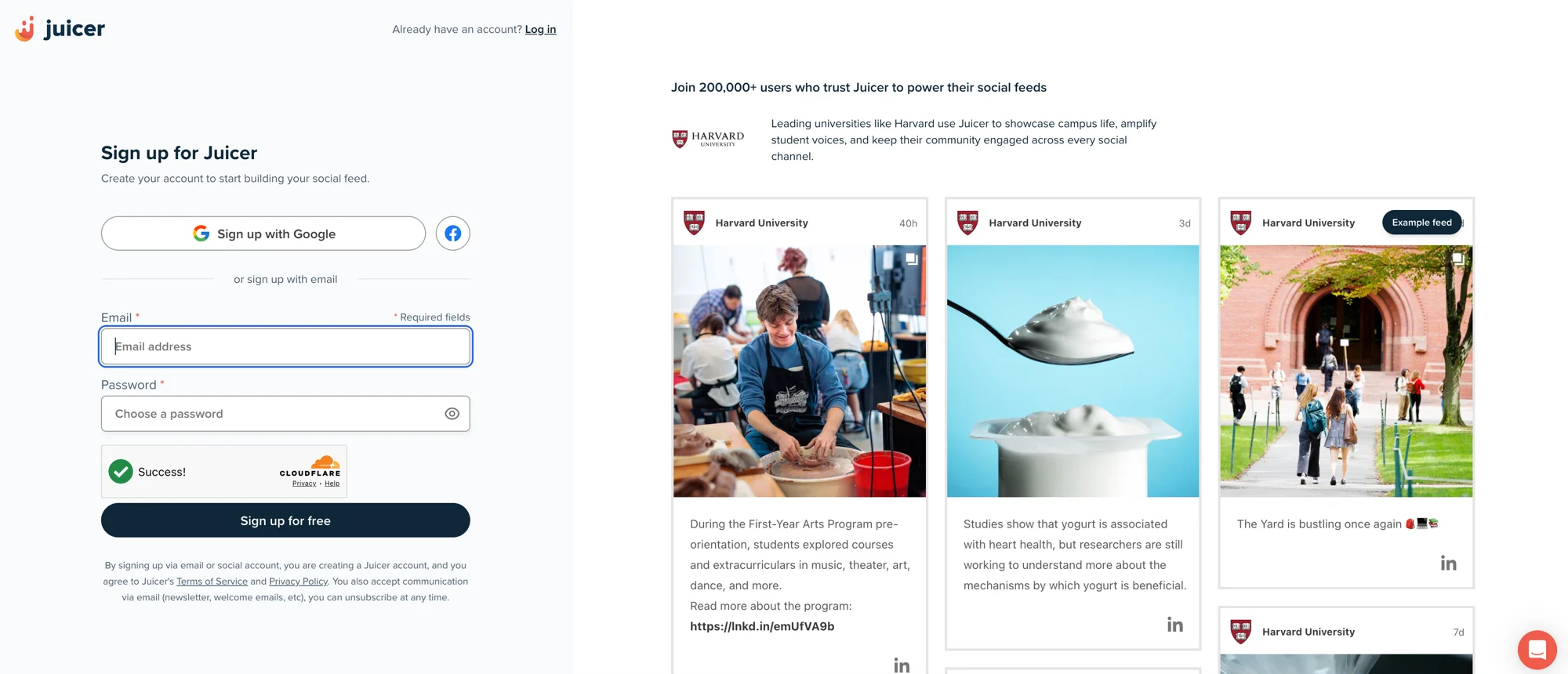
Input your email address and select a password, then click “Sign up for free”, or choose one of the social network options to sign up with.
-
2
Select Flickr social media icon
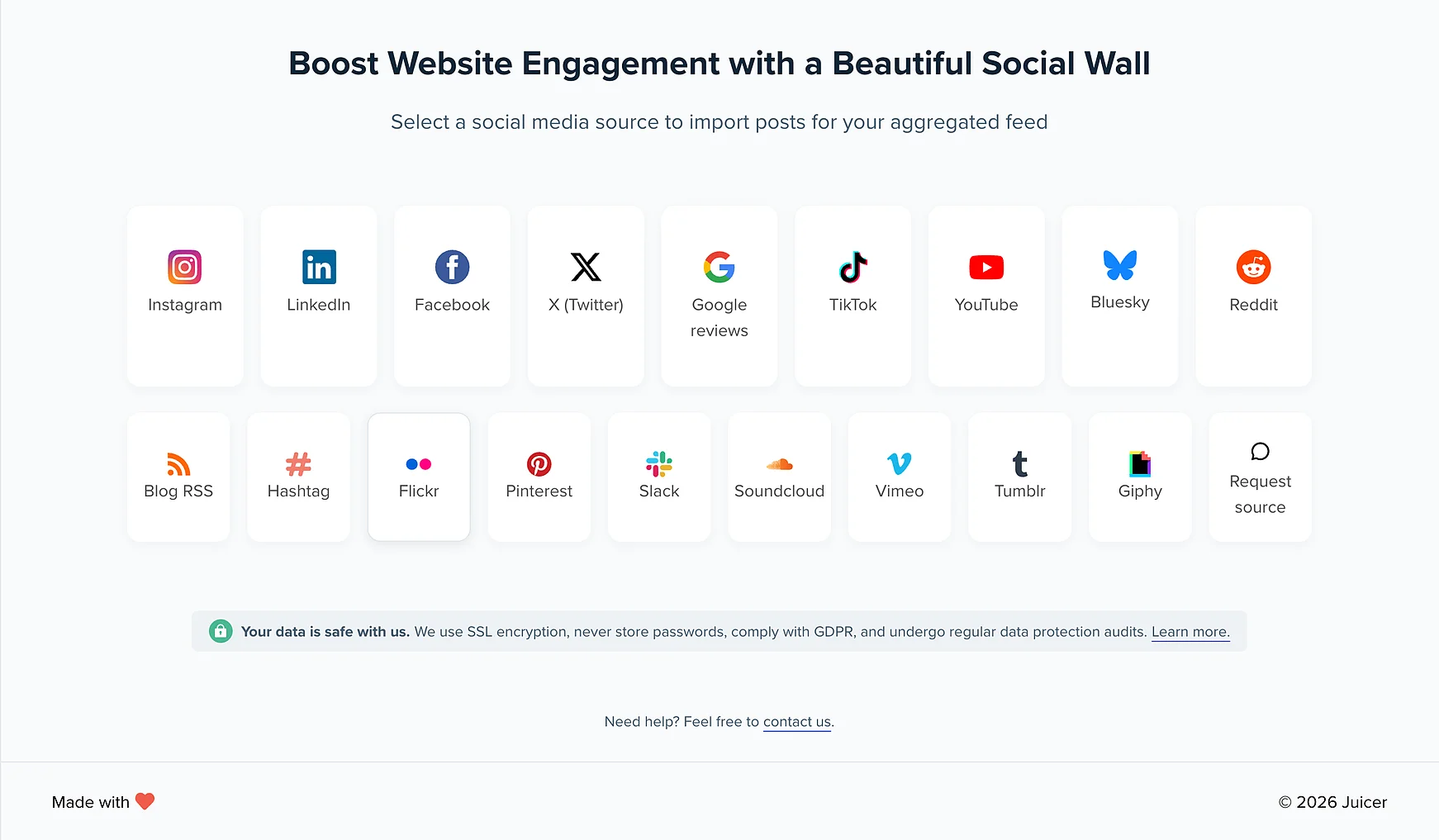
After you've signed up, you'll see a list of social media icons. Click on the Flickr icon.
-
3
Create Source
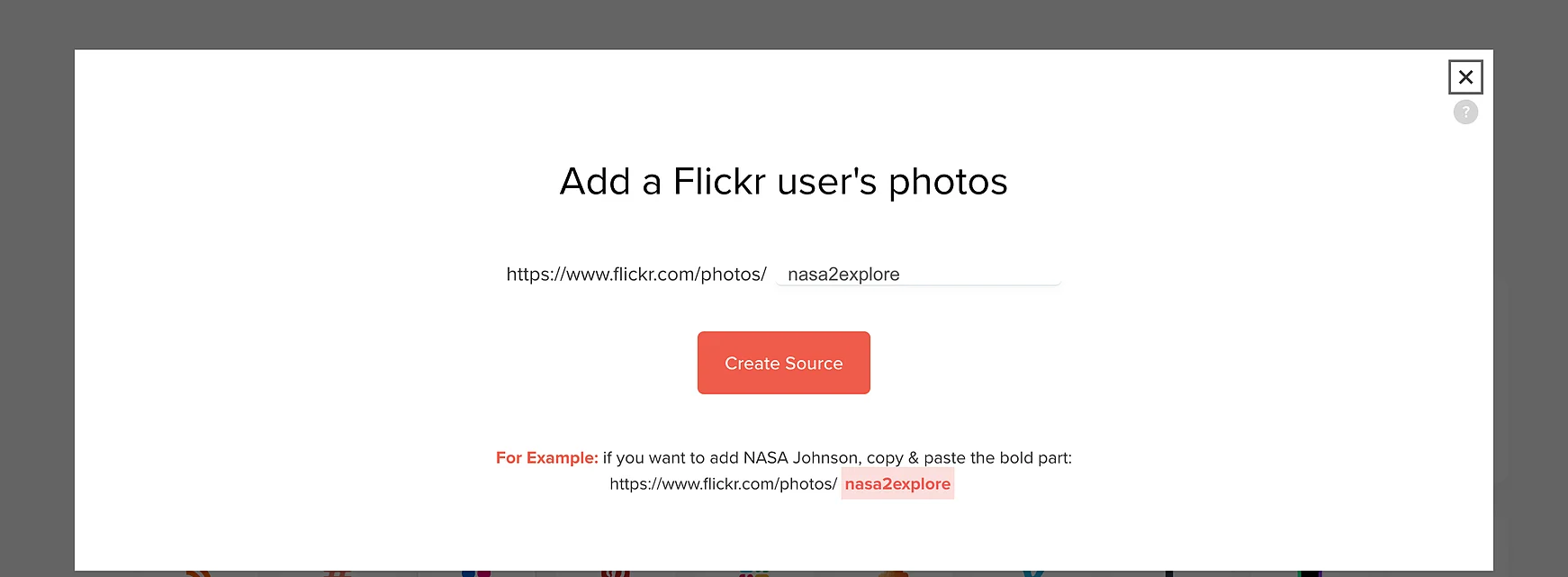
Once you click “Create Source” Juicer will automatically curate all of your posts from your Flickr page. Once all of your Flickr content has been curated, you'll be directed to your feed editor.
-
4
Embed the Flickr feed on your website
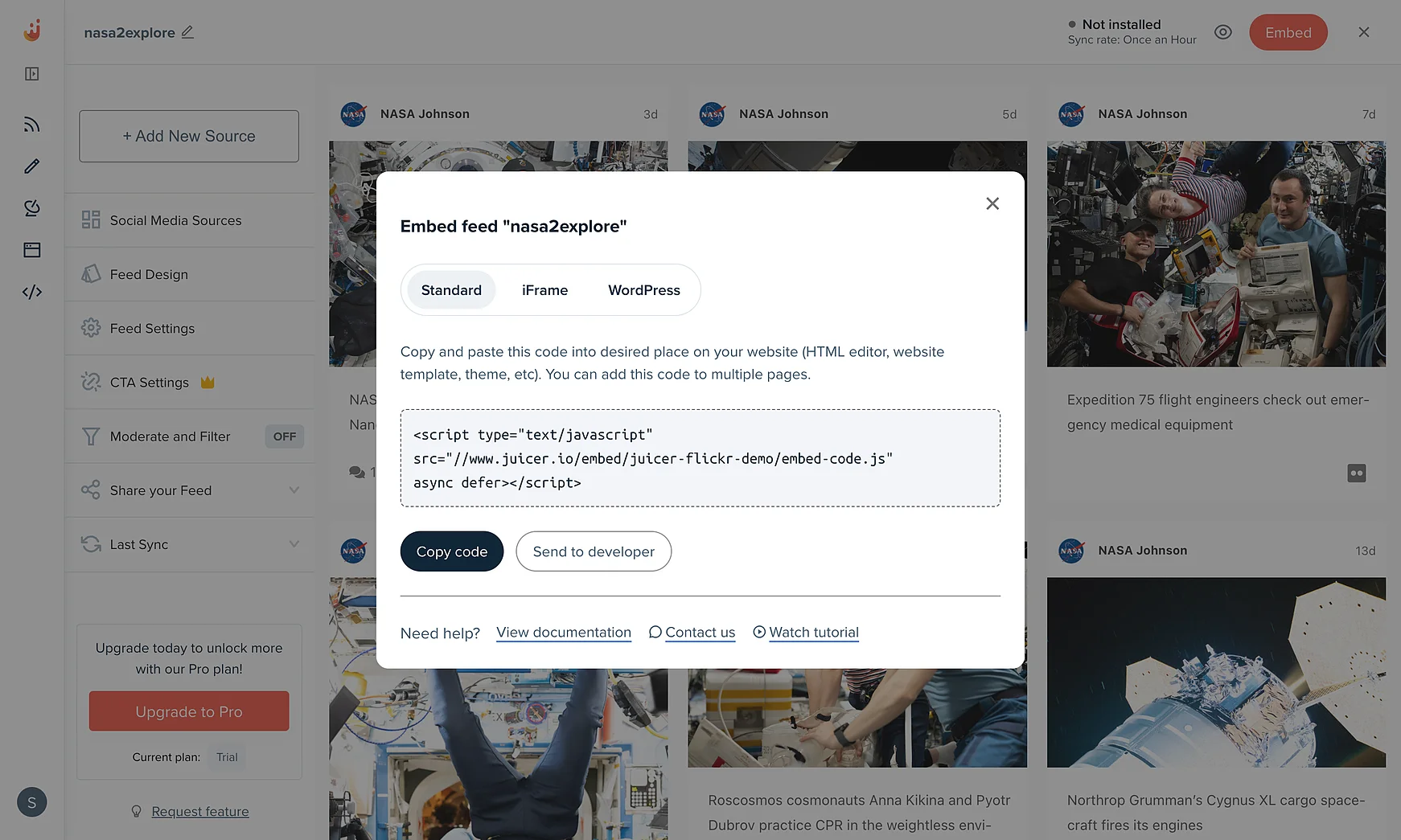
In order to embed the Flickr aggregator on your website, go to the top bar of your feed editor page and click on “Embed”.
You can simply copy and paste this code into your website on any page you would like to feature your Juicer Flickr feed.
Supported platforms
Juicer plans allow as many as 15 source accounts per feed. You can aggregate and moderate your social wall with feeds from popular platforms like Facebook, Instagram, TikTok, X (Twitter), LinkedIn and many more.
- TikTok
- YouTube
- X (Twitter)
- Bluesky
- Google reviews
- Tumblr
- Blog RSS
- Slack
- Giphy
- Soundcloud
- Flickr
- Vimeo
I love that I can connect so many social channels in one feed. I love how customizable the design is and the ability to filter the social content to exactly what you're looking for. It's so easy to add to a website and you can add in branded elements or change the design to fit your site.

Your beautiful social feed
live in just a few minutes!
-

01
Connect your social accounts
Connect Flickr alongside Instagram, Facebook, YouTube and other platforms to bring your photography and social content together in one feed.
-

02
Customize your social media feed
Choose from a range of layouts and add call-to-action buttons for bookings, print sales, or more. Personalize the design to match your brand for a professional, polished look.
-

03
Embed the feed on your website
Easily embed your curated feed onto your website using an HTML snippet, iframe, or WordPress plugin, whether it's a homepage, blog, or dedicated landing page.


Trusted by 200 000+ customers big and small
From personal projects to enterprise brands and events, Juicer's social wall enhances content reach, engagement, and brand visibility.


Frequently asked questions
Find answers to your common questions about Juicer's Flickr aggregator feature.
-
What is a Flickr aggregator?
A Flickr aggregator allows you to pull images, albums, and collections from your Flickr account (or multiple sources) into one clean, unified feed that you can embed directly on your website. -
Can I connect multiple Flickr accounts or albums?
Yes - Juicer supports aggregating content from multiple accounts, albums, or groups, making it easy to display curated photography and collections in one place. -
What type of Flickr content can I display?
You can embed individual photos, albums, or entire collections from Flickr, giving you flexibility to showcase your work, campaigns, or community projects. -
How often does the Flickr feed update?
Juicer automatically refreshes your feed, ensuring the latest photos and albums from Flickr appear on your site in real time without manual updates. -
Can I customize how my Flickr feed looks?
Absolutely. You can select from Juicer's templates or use Custom CSS to fully match the feed design to your website's branding and layout. -
Does embedding Flickr content affect SEO?
Yes - embedding a Flickr feed adds dynamic, regularly updated content to your site. This helps improve dwell time, boosts organic traffic, and strengthens search rankings. -
Do I need technical skills to embed a Flickr feed?
Not at all. Juicer provides a simple embed code you can copy and paste into your website. Advanced customization is optional for users with coding knowledge.