
Juicer Google reviews aggregator
Google reviews aggregator for your social wall
Google Reviews are one of the strongest forms of social proof. Juicer lets you aggregate, curate, and display your latest Google Reviews in a beautiful social wall, automatically updated and easy to embed. Showcase real customer feedback on your website to build trust and increase conversions.

How the Juicer Google reviews aggregator works
In a world full of choices, trust stands out. Customer reviews on Google help people evaluate businesses, reduce hesitation, and make confident decisions.
Juicer's Google reviews aggregator lets you embed curated reviews directly on your site, no need for visitors to leave the page or search elsewhere. Whether on your homepage, landing page, or product page, a live reviews feed can build credibility, reduce bounce rates, and increase conversions. Let your customers do the talking.

Google reviews aggregator use cases
Google reviews aggregator for education
Showcase authentic reviews from students, parents, and alumni to build trust in your institution. Display real feedback about academics, campus life, and student support to help prospective students make informed decisions, all without leaving your website.
Google reviews aggregator for food and hospitality
Highlight real customer experiences from restaurants, cafés, hotels, and hospitality venues. Display Google reviews that reflect food quality, service, and atmosphere to attract new guests and encourage bookings or visits.
Google reviews aggregator for marketing agencies
Use client reviews as powerful social proof for your agency. Showcase verified Google reviews that highlight results, professionalism, and expertise to build credibility and convert more prospects into leads.
Benefits of a Google reviews social wall

Stream fresh reviews effortlessly
Juicer automatically updates your website with the latest Google reviews, keeping your content fresh without any manual work. Whether it's student feedback, guest experiences, or client testimonials, visitors always see up-to-date and relevant reviews that reflect your business today.
Boost engagement and time on site
Displaying a live Google reviews feed keeps visitors engaged longer as they read real customer experiences. Reviews help reduce uncertainty, lower bounce rates, and encourage prospective students, guests, or clients to explore your site in more detail.
Amplify social proof and credibility
Showcase authentic, verified Google reviews directly on your website to build instant trust. Real feedback from customers, diners, or clients strengthens your reputation and helps establish credibility in a way static marketing content cannot.
Seamless brand consistency
Juicer's customization tools let your Google reviews wall match your website's branding, from layout and colors to typography. Maintain a consistent look and feel across your site while presenting social proof in a polished, professional way.
Turn browsers into customers
Place high-impact Google reviews exactly where decisions are made, on landing pages, service pages, or product listings. Highlighting positive experiences at the right moment helps convert prospective students, guests, or leads without sending them offsite.
Enhanced SEO benefits
A dynamic Google reviews feed adds fresh, user-generated content to your website. Search engines value regularly updated content, helping improve dwell time, increase organic visibility, and strengthen your site's overall SEO performance.
We like the juicer adds a live component to our website, automatically pulling content from our various social media feeds.

How to set up Google reviews aggregator to embed Google reviews on your website
Watch our video guide on how to setup a Google reviews feed on your website
Or follow our step by step instructions
-
1
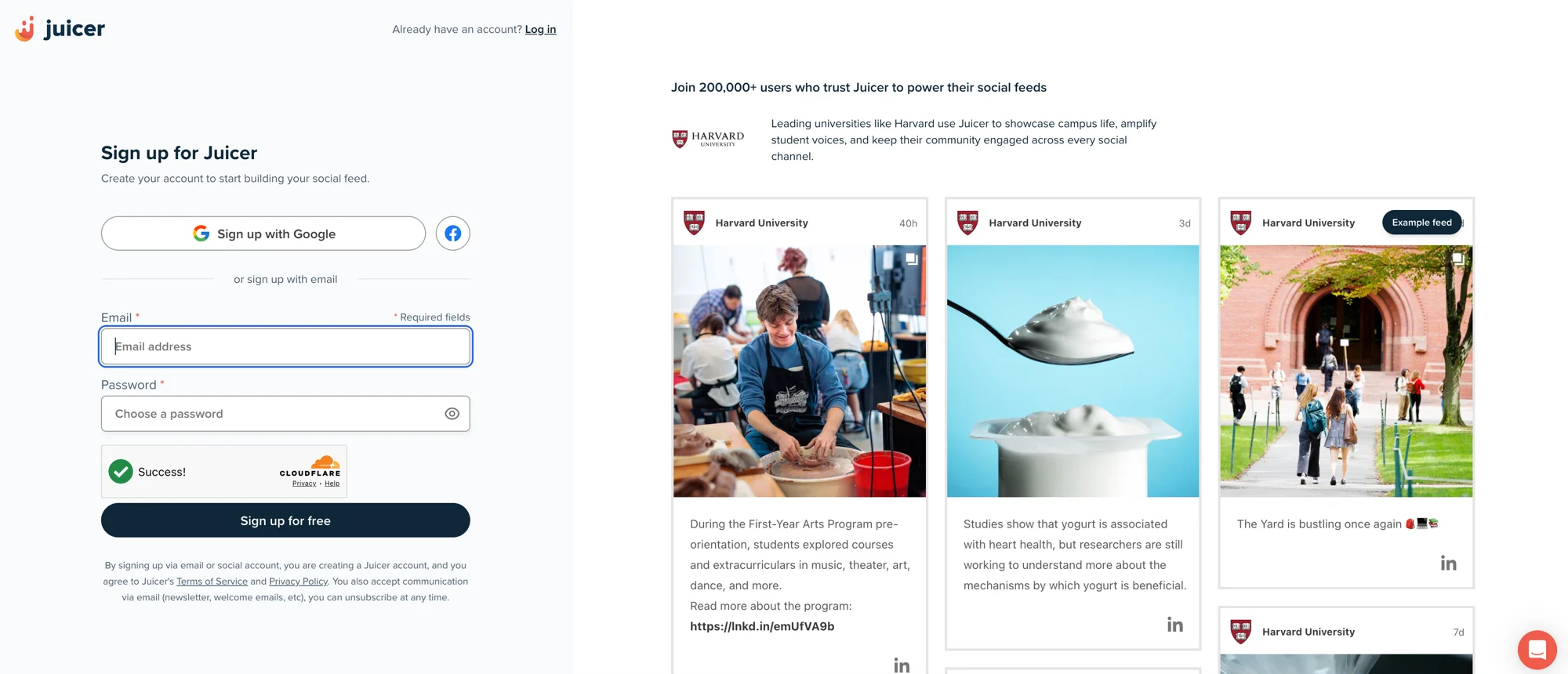
Sign up for Juicer's Google reviews aggregator (it's free!)
Input your email address and select a password, then click “Sign up for free”, or choose one of the social network options to sign up with.
-
2
Select Google reviews social media icon
After you've signed up, you'll see a list of social media icons. Click on the Google reviews icon.

-
3
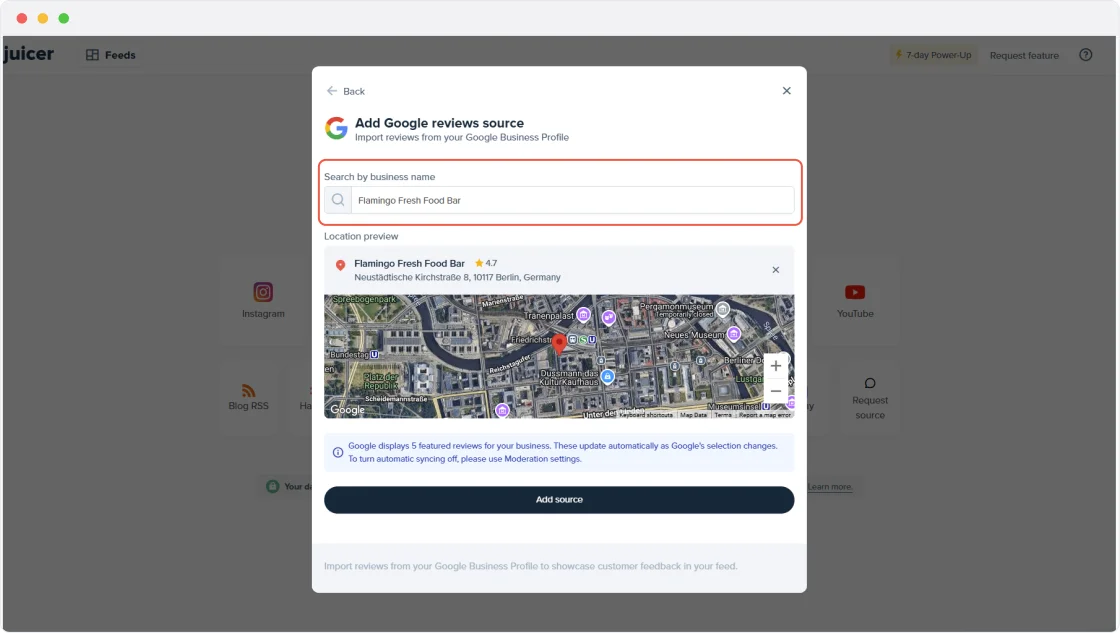
Create Source
Type in your business name and select it in the suggested list. Once you click “Add source” Juicer will automatically curate your Google reviews. Once all of your Google reviews content has been curated, you'll be directed to your feed editor.
-
4
Embed the Google reviews feed on your website
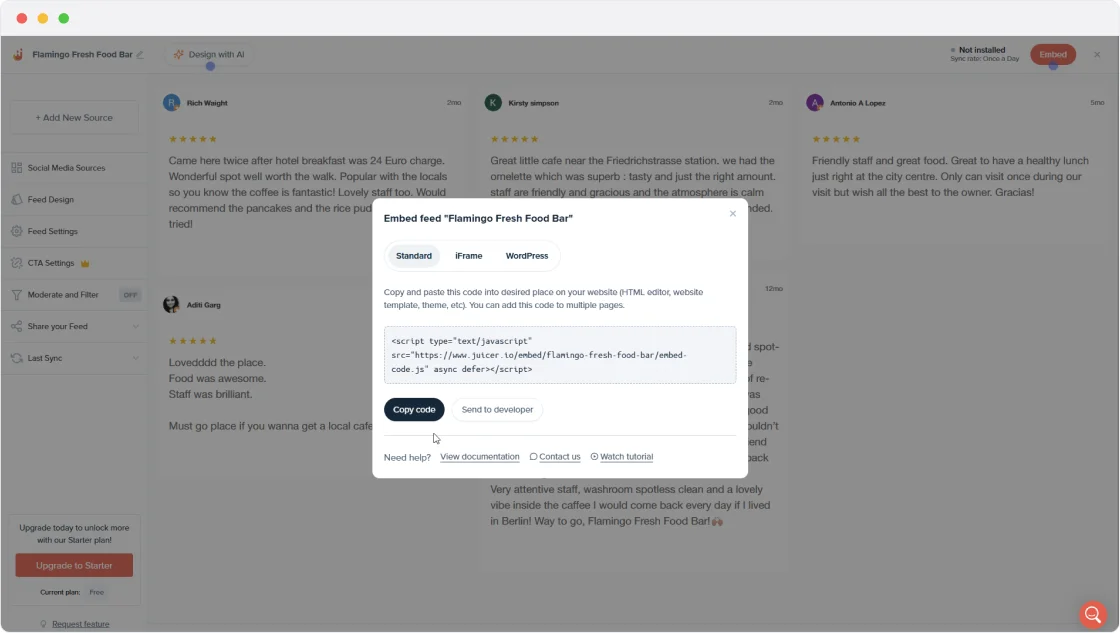
In order to embed the Google reviews aggregator on your website, go to the top bar of your feed editor page and click on “Embed”.
You can simply copy and paste this code into your website on any page you would like to feature your Juicer Google reviews feed.
Google reviews
social wall in action
Supported platforms
Juicer plans allow as many as 15 source accounts per feed. You can aggregate and moderate your social wall with feeds from popular platforms like Facebook, Instagram, TikTok, X (Twitter), LinkedIn and many more.
- TikTok
- YouTube
- X (Twitter)
- Bluesky
- Google reviews
- Tumblr
- Blog RSS
- Slack
- Giphy
- Soundcloud
- Flickr
- Vimeo
I love that I can connect so many social channels in one feed. I love how customizable the design is and the ability to filter the social content to exactly what you're looking for. It's so easy to add to a website and you can add in branded elements or change the design to fit your site.

Your beautiful social feed
live in just a few minutes!
-

01
Connect your social accounts
Connect your Google Business Profile alongside Instagram, Facebook, YouTube and other platforms to bring your reviews and social content together in one feed.
-

02
Customize your social media feed
Choose from a range of layouts and add call-to-action buttons for bookings, enquiries, or directions. Personalize the design to match your brand for a professional, polished look.
-

03
Embed the feed on your website
Easily embed your curated feed onto your website using an HTML snippet, iframe, or WordPress plugin, whether it's a homepage, landing page, or product page.


Trusted by 200 000+ customers big and small
From personal projects to enterprise brands and events, Juicer's social wall enhances content reach, engagement, and brand visibility.


Frequently asked questions
Find answers to your common questions about Juicer's Google reviews aggregator feature.
-
What is a Google reviews aggregator?
A Google reviews aggregator collects and displays customer reviews from Google in a single, organized feed on your website. It allows you to showcase real feedback, star ratings, and reviewer details in one place to build trust and credibility. -
How does Juicer's Google reviews aggregator work?
Juicer connects to your Google business profile and automatically pulls in your latest reviews. Once connected, your reviews are displayed in a live feed on your website and update automatically as new reviews are published. -
Can I display reviews from multiple Google locations or businesses?
Yes. Juicer allows you to aggregate Google reviews from multiple locations or business profiles into a single social wall. This is especially useful for schools with multiple campuses, hospitality groups, or agencies managing several clients. -
Are Google reviews updated automatically?
Yes. Your Google reviews feed refreshes automatically, so new reviews appear on your website without any manual updates. This ensures your social proof is always current and relevant. -
Can I moderate or hide specific reviews?
Yes. Juicer gives you full moderation control, allowing you to approve, hide, or remove specific reviews before they appear on your site. This helps you maintain quality while still showcasing authentic feedback. -
Is the Google reviews feed mobile responsive?
Absolutely. All Google reviews feeds created with Juicer are fully responsive and look great on desktop, tablet, and mobile devices. -
Can I customize the appearance of the Google reviews feed?
Yes. You can customize layout, colors, fonts, and spacing to match your website's branding. This ensures your reviews wall feels like a natural part of your site, not a third-party embed.