
If you’re here, chances are Flockler isn’t wrong – it’s just not right for you. While it’s a capable platform, many teams find it hard to onboard, complex to manage across multiple users, and difficult to justify at $129/month with no free plan.
That’s why we created this guide to the best Flockler alternatives. We looked closely at tools that offer lower starting prices, free plans or trials, simpler workflows, stronger performance, and more flexible customization – without sacrificing reliability.
Our recommendations for Flockler alternatives are based on feature sets and real user feedback, so you’re not just getting a list, but a practical comparison.
| Flockler Alternatives | Standout feature | Free plan available? | Paid plans starting from.. | G2 Rating |
| Juicer.io | Powerful post moderation options | Yes | $15 / month | 4.4 |
| Tagembed | Easily customizable appearance | 14-day free trial | $19 / month | 4.7 |
| Smash Balloon | Youtube feeds standout | No | $299 / year (no monthly available) | 4.1 |
| Walls.io | Brand safety & GDPR compliance prioritized | 14-day free trial | $270 / month | 4.8 |
| Elfsight | Easy to set up | Yes | $ 5 / month | 4.8 |
| SociableKIT | Affordable & functional plans | Yes | $ 10 / month | 0 reviews |
| Curator.io | Strong collaborative features | Yes | $25 / month | 4.6 |
| Flowbox | Fast load times | No | No pricing available | 4.8 |
This table above outlines the best Flockler alternatives that we’ve compiled. For a detailed review of each, continue reading.
1. Juicer.io

What are Juicer.io’s top features?
- Multi-platform social aggregation pulling content from 15+ sources including Instagram, TikTok, Facebook, LinkedIn, YouTube, X, and RSS, with automatic real-time updates
- Built-in moderation and analytics, giving teams control over what appears on the feed and visibility into engagement and performance
- Flexible embedding options, including WordPress plugin, iFrame, and JavaScript, plus API access for advanced integrations
- Customizable layouts and themes, allowing feeds to visually align with brand identity with just a few clicks
How much does Juicer.io cost?
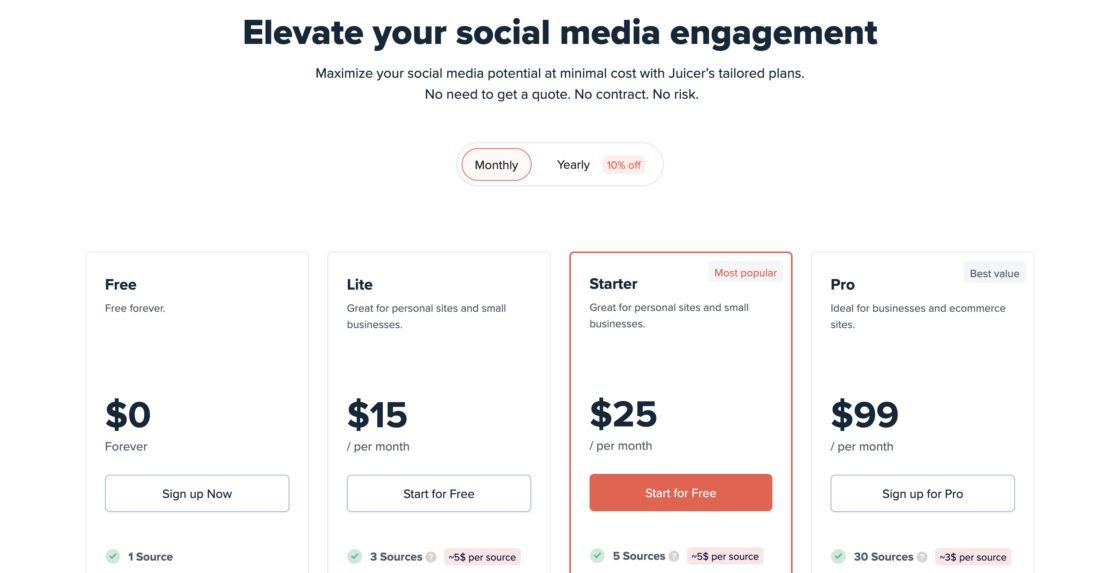
Juicer.io offers a Free plan that’s truly forever ($0) with 1 source, daily refresh, and limited branding – great for basic social walls. Paid tiers start with Lite (~$15/mo) for 3 sources and hourly refresh, Starter (~$25/mo) for up to 5 sources plus automatic moderation and CTAs, and Pro (~$99/mo) for up to 30 sources across 3 feeds with a 10-minute refresh and custom design options.
An Enterprise tier ($199+/mo) adds unlimited sources/feeds, API access, team management, and priority support. There’s also an Event plan ($299/yr) for short-term real-time feeds. Overall, Juicer.io plans prove to be worthwhile compared to other Flockler alternatives.
What are the pros and cons of using Juicer.io?
✅ Easy setup and intuitive UI – good even for non-technical users and easy to hand off across teams
✅ Strong value for money – offering more platform integrations and channel mixes at lower price points than many competitors
✅ Responsive, reliable customer support – makes for a great tool for the long-term
❌ Customization limits on lower-tier plans – more advanced design options locked behind higher pricing
“I really like that Juicer is very interactive and easy to use. The intuitive design makes it simple to do quick edits and to showcase our social media feeds with a more branded look. Their support team is really good…. The initial setup was also super easy.” – Mary C.
2. Tagembed

What are Tagembed’s top features?
- Easy social feed integration across platforms like Google Reviews, LinkedIn, and other social networks, with smooth embeds for WordPress, Elementor, and even SharePoint
- Strong customization and moderation tools, including filtering feeds (e.g. showing only 5-star reviews) and combining multiple sources into one gallery
- Responsive customer support, especially via live chat, helping with setup, copyright questions, and troubleshooting
How much does Tagembed cost?
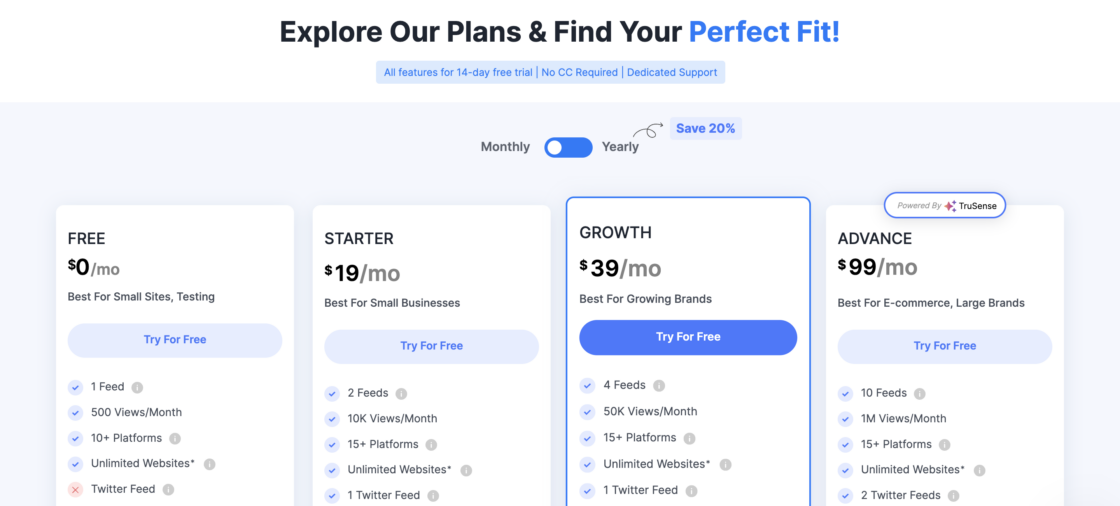
Tagembed has a Free plan with basic social feed aggregation and widgets, letting you curate and display user generated content from 20+ networks and embed it on unlimited websites.
Paid tiers typically range from Starter ($19/mo) to Growth ($29/mo) and Advance ($99/mo) – each boosting feed limits, customization options like themes and layout, moderation tools, and collaboration features.
Enterprise / custom options are available, and some plans include free trials making it one of the cheaper Flockler alternatives.
What are the pros and cons of using Tagembed?
✅ User-friendly and fast to implement – even for non-technical users, saves time during setup and experimentation
✅ Helpful, responsive support team – frequently cited as a major reason users stick with the platform
❌ Pricing and plan limitations – people want more flexible or generous feed limits, especially at lower tiers
❌ Learning curve and documentation gaps – some users find the interface confusing at first and want more tutorials or real-world examples
“A bit confusing to use, but some of the customer service reps are very helpful while others not. Overall, a good experience.” – VH
“I love how easy it is to use Tagembed; the setup was straightforward as I just needed to install the plugin and sign in, making the integration with WordPress websites seamless.” – Declan M.
3. Smash Balloon
What are Smash Balloon’s top features?
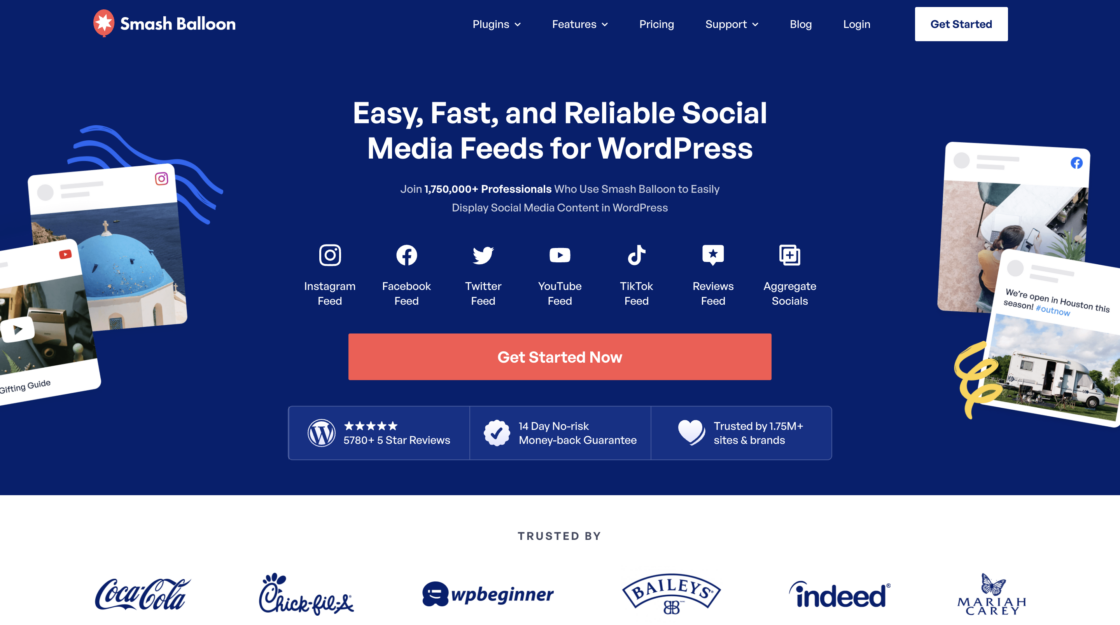
- WordPress-native social feed plugins for platforms like Instagram, Facebook, YouTube, and Twitter, built specifically for easy WordPress integration
- Flexible display and layout controls, allowing feeds to visually match site branding without custom code
- Multiple feed and playlist support, especially praised for YouTube videos feeds and organized aggregated content presentation
How much does Smash Balloon cost?
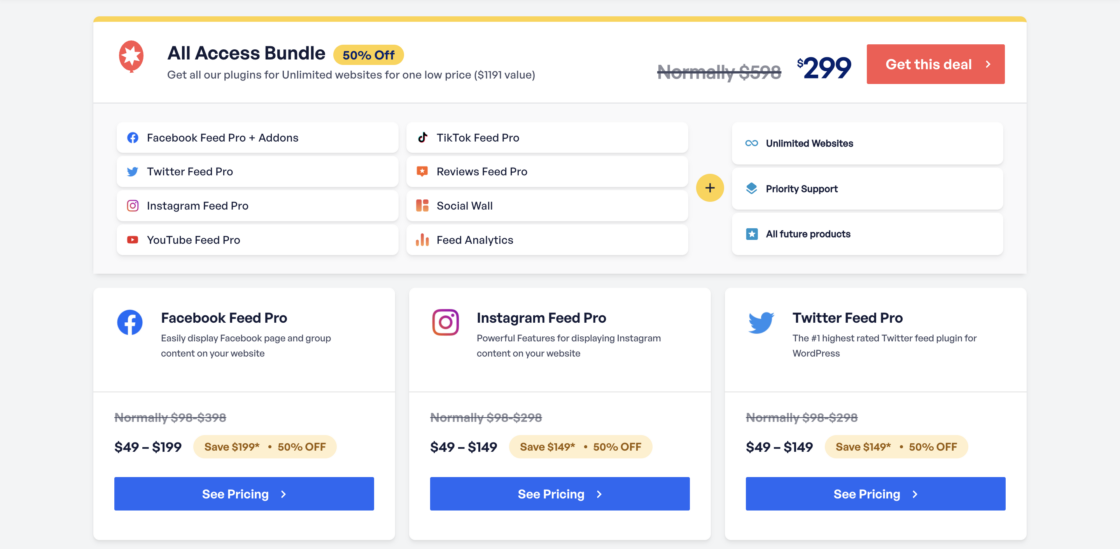
Pricing is plugin-based for WordPress: individual plugins for platforms like Instagram, Facebook, YouTube, Twitter, Tiktok, Reviews, normally range roughly $49–$298/year per plugin.
There are three tiers: Basic, Plus, Elite. Unlike most Flockler alternatives, Smash Balloon does not offer a free plan. For more complete coverage, the All Access Bundle ($299/year) includes all current and future pro plugins with unlimited website use and priority support.
A 14-day money-back guarantee lets you try it for a limited time.
What are the pros and cons of using Smash Balloon?
✅ Easy to use interface with no coding required – accessible for non-technical users and quick to deploy
✅ Highly customizable display options – helps maintain brand consistency across websites by collecting social feeds
❌ Limited and restrictive free version – many find this insufficient for proper testing before upgrading
❌ Performance and support concerns – including reports of slower site load times, backend limitations, and inconsistent or slow customer support responses
“They have a lot of features they have thought through and a good amount of customizability…. However the back-end implementation for the feeds is remedial, and the support feels nonexistant as some of these features are not even working and I am having trouble hearing back from their team.” – Julian A.
“This plugin for social media feed embed in the website is well done. We use it for YouTube feed, it allowed us to create a specific menu to show all videos in every playlist. We are very satisfied…” – AK.
Read a deeper dive on Smash Balloon and Flockler alternatives here.
4. Walls.io

What are Walls.io’s top features?
- Social walls for events and marketing campaigns, allowing teams to aggregate and display UGC from multiple social platforms in real time
- Strong customization and theming options, with multiple ready-made layouts and one-click design changes for different screen types
- Advanced moderation, GDPR, and brand-safety controls, including filters, accessibility-friendly layouts, and EU hosting with DPAs
- Broad integrations and API access, making it easy to connect with CMS platforms, event tools, digital signage, and custom workflows
How much does Walls.io cost?
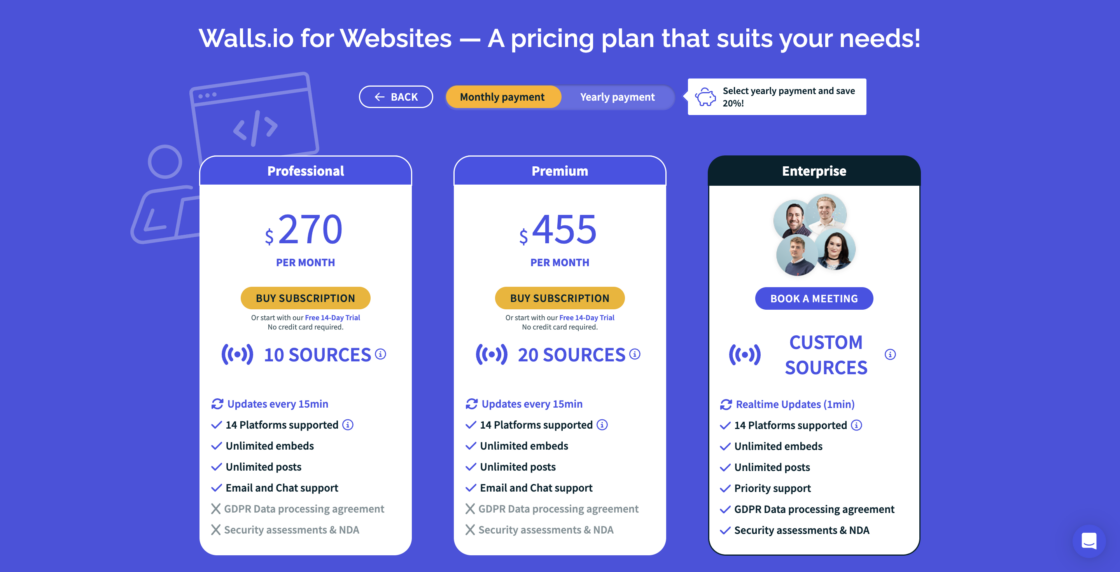
Plans for different website social walls typically begin with Professional ($270/month) (14 social sources with 15-minute refresh), followed by a Premium tier ($455/month) with more sources and additional advanced features, and custom Enterprise options for unlimited embeds and realtime updates.
All paid plans come with powerful moderation, analytics, and customization, and there’s a 14-day free trial with no credit card required.
What are the pros and cons of using Walls.io?
✅ Easy to set up and customize – even for non-technical users running live events or charity campaigns
✅ Reliable and dedicated support team – responsive customer service and confidence-building brand safety and GDPR compliance features
❌ Pricing can be very high for smaller organizations – especially for nonprofits or teams in lower-budget regions
❌ Limited historical post pulling and a learning curve to uncover all available integrations
“It’s the best of both worlds for internal Facebook feel or external hashtag campaigns and allows attendees to post however they feel comfortable… you can’t comment on the internal posts, only like, and they don’t notify you if someone likes your posts.” – David B.
“While there are cheaper [social media aggregation] tools out there, none of them give me the same confidence around brand safety, GDPR compliance, and accessibility… Hosting in the EU and offering DPAs is another huge plus for us, since legal and IT security always ask about those details… Pricing can feel higher than some alternatives” – Yulija K.
5. Elfsight
What are Elfsight’s top features?
- Large library of embeddable widgets, including social feeds, reviews, sliders, calendars, and contact tools that work across most website builders
- Easy installation and broad platform compatibility, with especially strong support for no-code builders like Weebly and WordPress
- High customization flexibility, allowing users to match branding, adjust layouts, and even add custom CSS
- Lightweight scripts designed to minimize social wall impact on page load times
How much does Elfsight cost?
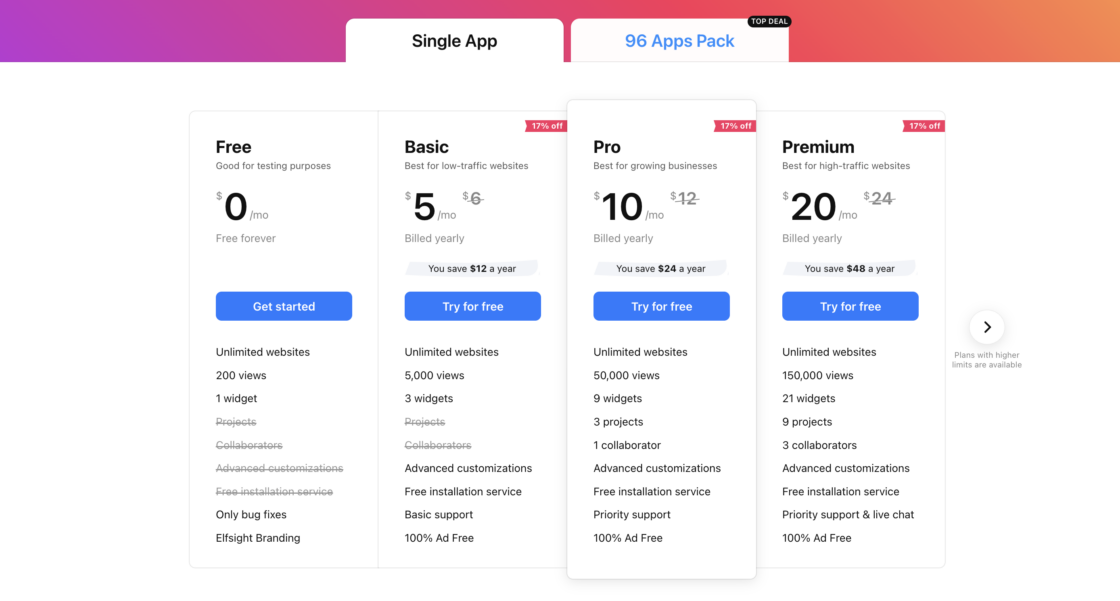
They offer both free and paid plans for individual widgets or all-apps packs. The free plan includes 200 monthly views and 1 widget with basic support. Check out a comparison between Juicer.io and Elfsight free plans here.
Paid Single App plans start at Basic ($5/mo) with 5,000 views and 3 widgets, Pro ($12/mo) with 50,000 views and 9 widgets, and Premium ($24/mo) with 150,000 views and 21 widgets; all include unlimited websites and customization support.
Higher Enterprise tiers ($42–$112/mo) scale views, widgets, and projects further and add social account managers and advanced support. Elfsight also has All Apps Pack plans that bundle 90+ widgets across all apps at higher price points.
What are the pros and cons of using Elfsight?
✅ Fast setup – popular with agencies and freelancers managing multiple sites and social walls
✅ Consistent customer support – friendly, responsive, and helpful with custom solutions
❌ Strict view limits across plans – including the free and paid tiers, causing widgets to deactivate on higher-traffic sites
❌ Pricing and plans lack flexibility – especially for professionals managing multiple social media networks, websites, or clients
“Elfsight widgets are surprisingly easy to use and endlessly customizable… Excellent customer service too. Fast, complete and extremely helpful!” – Emma T-M.
“The time saved, is the most valuable thing about Elfsight. So quick and easy to embed a widget into the sites I manage. Most of the sites I work on have been built using the Weebly webpage builder…” – Dave P.
6. SociableKIT
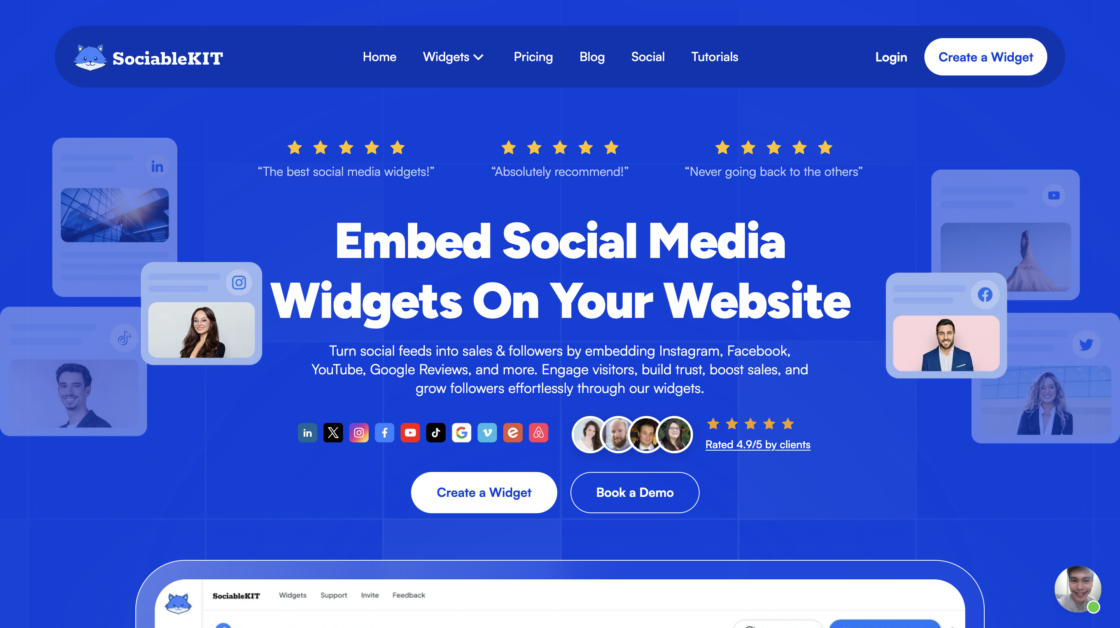
What are SocialbleKIT’s top features?
- 100+ no-code widgets, including Google Reviews, Instagram feeds, Facebook events, YouTube, and TikTok embeds and no coding skills needed
- Highly customizable embeds, with layout, styling, and branding controls for social walls on paid plans
- SEO-friendly widgets, designed to add social proof without hurting site performance
How much does SociableKIT cost?
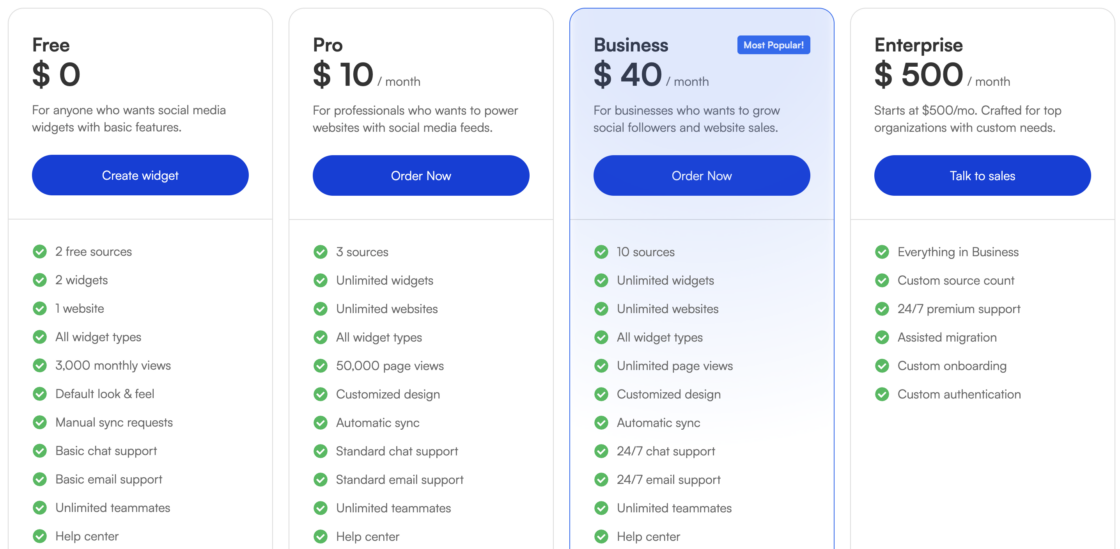
SociableKIT has a Free plan ($0) that gives 2 widgets, 3,000 monthly views, and 2 sources, plus a 7-day premium plan trial. The Pro plan ($10/mo) increases views (50,000), retains unlimited widgets and domains, and adds chat and email support.
The Business plan ($40/mo) offers unlimited views and up to 10 sources with 24/7 support, and there’s a custom Enterprise tier ($500/mo) for larger needs with expanded source limits and tailored support.
What are the pros and cons of using SociableKIT?
✅ Ease of setup – no code-installation is fast and beginner-friendly
✅ Highly customizable – if you’re willing to pay the price for that
❌ Limited customization on the free plan – requires using default designs unless upgraded
❌ Pricing can be higher than competitors – particularly for advanced customization and higher view limits
“SociableKIT was quick and easy to set up, but we’ll see if they rip it all away after the 7 day “trial period” like all the other ones did. Also wish they could put Google and Yelp reviews into 1 single widget, but for now i’m just putting 2 widgets stacked on my site, one for each.” – Reddit user
“I always think things should be easier… that said, the customer response was as quick as Ive ever had and walked me all the way thru. I got setup with minimal difficulty. Really impressed with their eagerness to help. Stayed with me the entire process and confirmed on their end.” – Mike M.
7. Curator.io
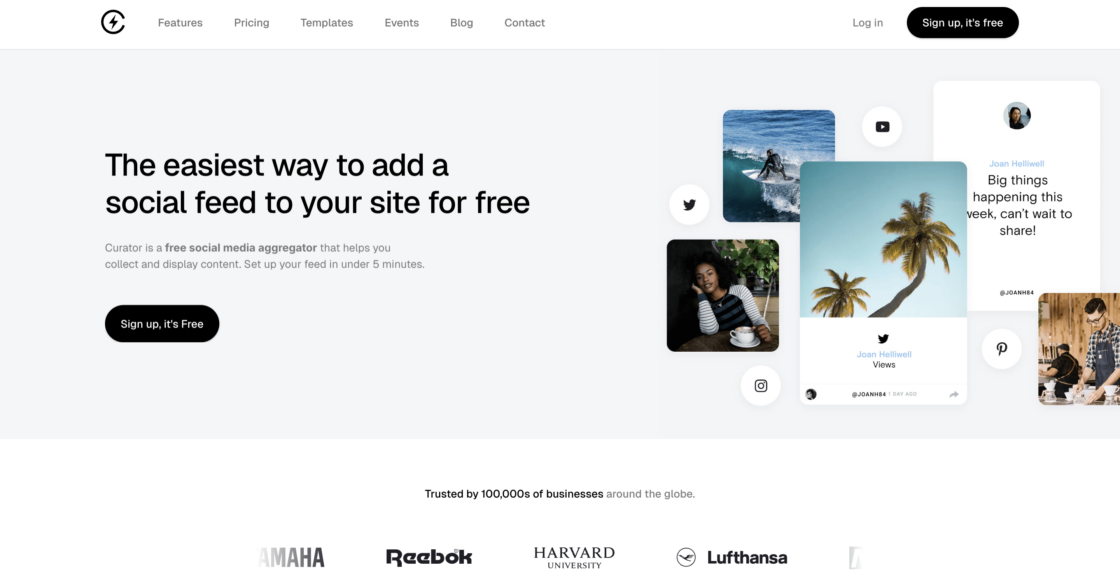
What are Curator.io’s top features?
- Quick setup and simple integrations, with well-documented tools for embedding social media feeds on websites
- Customizable moderation and display options, allowing teams to manage what aggregated content appears
- Affordable plans for small teams, making social aggregation accessible for tighter budgets and good collaboration functions
How much does Curator.io cost?
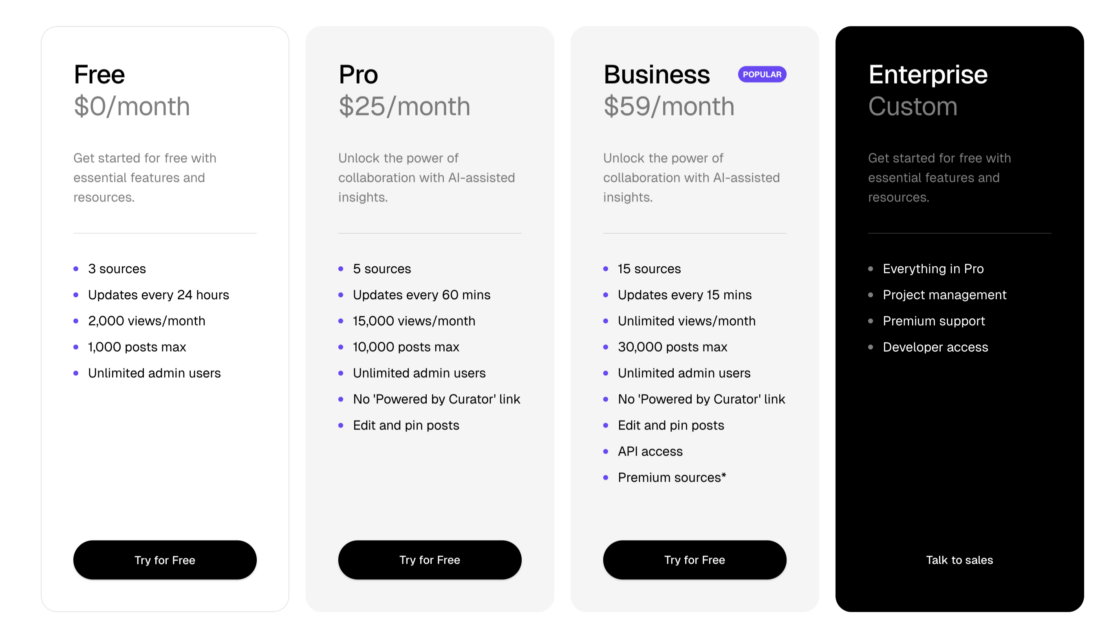
They provide a Free tier ($0) with 3 sources, 24-hour updates, 2,000 views/month, and up to 1,000 posts – a good starter option for social media aggregation.
The Pro plan ($25/mo) adds more frequent updates (every hour), up to 5 sources, 15,000 views, and up to 10,000 posts, while the Business plan ($59/mo) increases to 15 sources, 15-minute refreshes, unlimited views, and up to 30,000 posts along with API access and premium sources.
A custom Enterprise option offers additional project management and support features.
What are the pros and cons of using Curator.io?
✅ Easy to configure – reliable data syncing from connected social media accounts
✅ Responsive customer support – praised for fast resolutions and refunds
❌ Limited design flexibility – templates may not fully match advanced branding needs
❌ Occasional integration and media issues – particularly with video playback and linking to original social media posts
“Curator is easy to configure and integrate into websites. It is well-documented and supported. The subscription comes at a fair price, allowing small companies or departments with a restricted budget to take advantage of features that otherwise would not be available.” – Alexandre S.
8. Flowbox
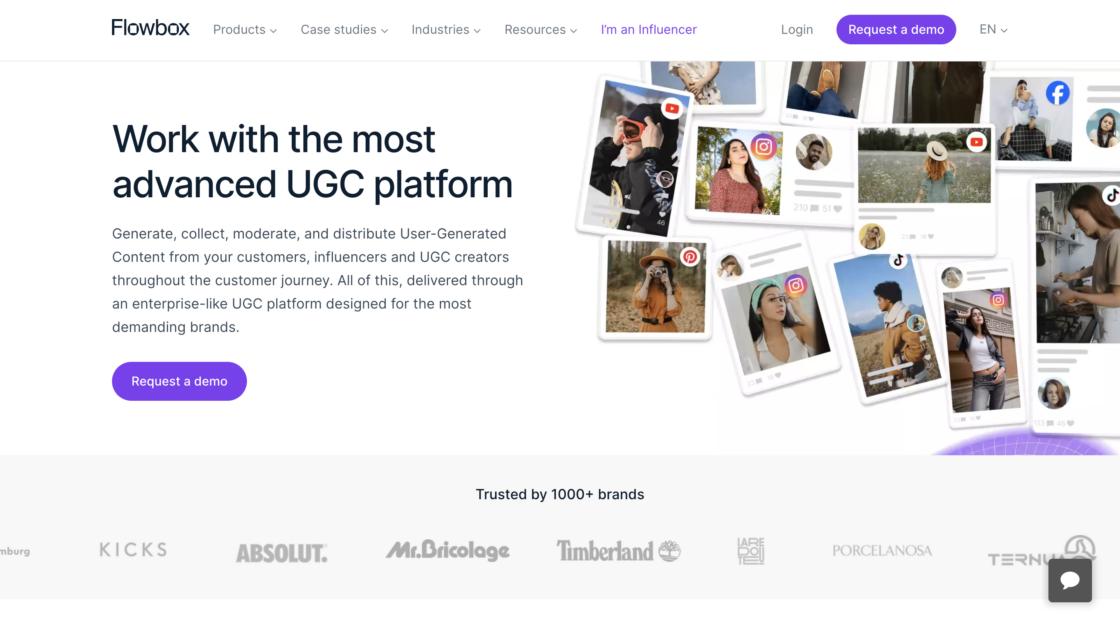
What are Flowbox’s top features?
- “Blazing-fast” load times, designed for embedding social media feeds without slowing down site performance
- Shoppable UGC galleries, with conversion tracking tied to individual content pieces
- Advanced analytics and insights, helping brands understand engagement and ROI
- Smart content filling, automatically populating galleries when tagged content is limited
How much does Flowbox cost?
No pricing page publicly available – only request for a demo.
Generally user feedback indicates that Flowbox is relatively expensive compared to competitors. Unlike most Flockler alternative platforms, Flowbox does not offer a free plan.
What are the pros and cons of using Flowbox?
✅ Optimized performance – especially for social wall layouts on high-traffic fashion and lifestyle sites
✅ Outstanding onboarding – demos, documentation, and a dedicated success team for embedding social feeds
❌ No public pricing – generally expensive, can be restrictive for individuals or smaller budgets
❌ Feature complexity and campaign limits – can be overwhelming for beginners or large-scale use for social media feeds
“I can easily create and publish content on social media platforms such as Instagram, Facebook, and Twitter, all from one centralized location… it can be a bit overwhelming for beginners. The tool has a lot of features and can take some time to learn how to use effectively. Additionally, the pricing for the tool can be a bit steep for individuals with limited budgets.” – Sanjay B.
“Automation of user generated content, which then allows to create shoppable galleries within product pages… Higher cost than competitors. Sometimes posts aren’t showing with the correct size on the website and need adaptation” – G2 User
Which is the best Flockler alternative?
The answer depends on your team, budget, and the features you need most. Some Flockler alternatives are simpler, some are more customizable, and others prioritize speed and reliability.
If you’re looking for a trusted, all-around solution, Juicer.io stands out.
With easy setup, automatic updates, and seamless integration with 15+ social platforms, it’s built to keep your website fresh without constant manual work. Add in powerful moderation, flexible pricing, and pre-built layouts, and you have a major platform that works for teams of any size.
Ready to see if it’s the right fit for you? Create a free Juicer.io account today and start bringing your social content to life.