
You built an app with Lovable in 20 minutes. Now you want to show live Instagram posts, TikTok videos, or YouTube content inside it. The hard way is wrestling with platform APIs. The easy way takes about 2 minutes.
Juicer is a social media aggregator that pulls posts from 15+ platforms into one feed and gives you an embed code. Drop that code into your Lovable app, and you have a live social feed that updates itself. No API keys, no token refreshes, no backend work.
Here is how to set it up, what it looks like, and why it beats building the integration yourself.
Why Your Lovable App Needs a Social Media Feed
If you are building with Lovable, you are probably moving fast. You describe what you want, the AI builds it, you iterate. That workflow breaks the moment you try to add live social media content.
Here is what happens when you try to do it yourself:
- Instagram requires a Facebook App, business account verification, and Graph API tokens that expire every 60 days. One expired token and your feed goes blank.
- TikTok’s API has a separate application process with approval times measured in weeks. Most side projects never get approved.
- YouTube’s Data API has a daily quota of 10,000 units. A single search request costs 100 units. Hit the limit, and your app stops showing videos until midnight Pacific time.
- Every platform returns data in a different format. Instagram gives you media URLs and captions. YouTube gives you video IDs and thumbnails. X/Twitter gives you tweet objects with nested entities. Normalizing all of that into one feed is real backend work.
None of this is what you signed up for when you opened Lovable and typed “build me a landing page with a social feed.”
Juicer handles all of it. You connect your social accounts once. Juicer fetches the posts, normalizes the data, handles token refreshes, and serves the feed through a single embed code. Your Lovable app just displays it.
How to Add Juicer to a Lovable App
Three steps. No backend code.
Step 1: Create a free Juicer feed
Go to juicer.io/sign-up and create a free account. Add the social media sources you want in your feed – your Instagram account, a YouTube channel, a TikTok profile, a hashtag, or any combination.
Juicer supports: Instagram, TikTok, YouTube, LinkedIn, Facebook, X/Twitter, Pinterest, Tumblr, Vimeo, Flickr, Bluesky, RSS/Blog, and more.
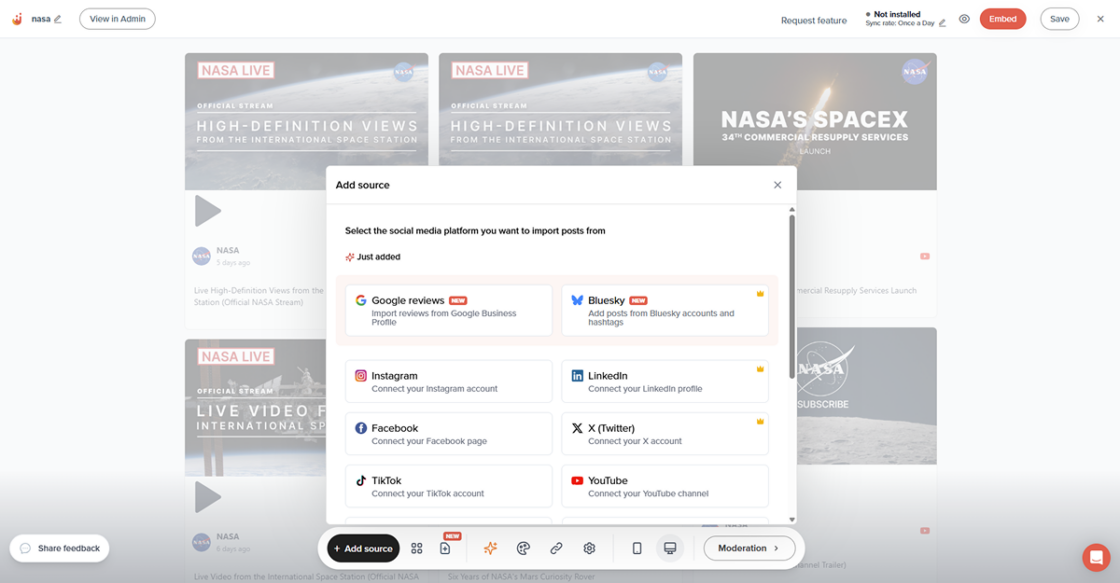
The free plan includes one feed with one source. Paid plans start at $15/month for more sources and customization options.
Step 2: Copy the embed code
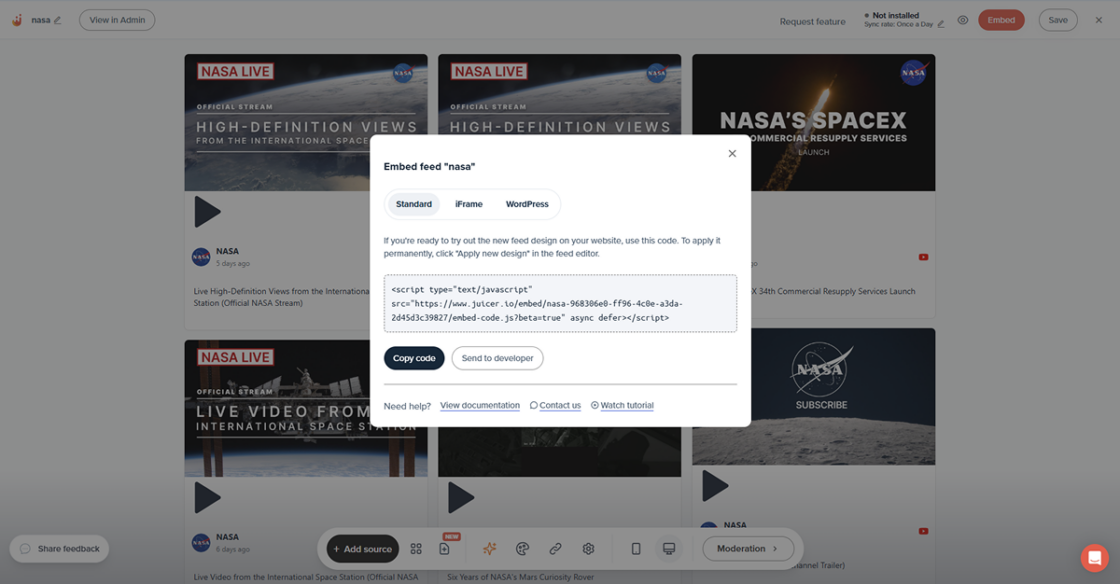
- In your Juicer dashboard, go to your feed and click the Embed button
- You’ll see a line of code containing your feed name — it’s the part between
/embed/and/embed-code.js. For example, in:<script type="text/javascript" src="<https://www.juicer.io/embed/**MY-COMPANY**/embed-code.js>" async defer></script>the feed name is MY-COMPANY. - Take a note of just that feed name — you won’t need the rest of that code.
- Paste the two lines of the embed code below where you want your feed to appear, replacing both instances of
your-feed-namewith the feed name from step 3:
<div class="juicer-feed" data-feed-id="**your-feed-name**"></div>
<script type="text/javascript" src="<https://www.juicer.io/embed/**your-feed-name**/embed-code.js>" async defer></script>
Now you code is ready to be added to the Lovable app.
Step 3: Add it to your Lovable app
Tell Lovable’s AI to do it. Paste the embed code into the chat and say something like “Add this social media feed to the homepage below the hero section.” Lovable will place the script and container in the right spots.
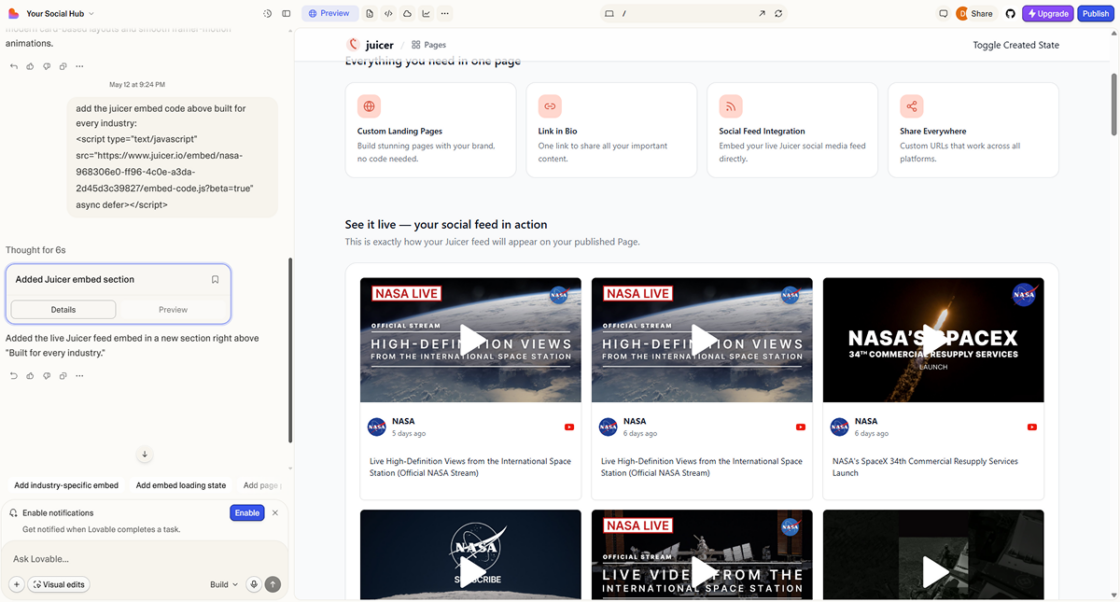
That is it. Your Lovable app now has a live social media feed that updates itself.
What You Can Build with This
The embed is flexible. Here are some things Lovable builders use it for:
- Portfolio sites. Pull your Instagram photos and YouTube videos into a “Recent Work” section. Always current, never stale.
- Client dashboards. Building a social media dashboard for a client? Juicer feeds show their live social content without you building API integrations for each platform.
- Event pages. Create a hashtag feed that pulls attendee posts from a branded hashtag. Embed it on the event page for live social proof.
- Restaurant and hospitality sites. Show the latest food photos and customer reviews from Instagram.
- Landing pages with social proof. Pull user-generated content from a branded hashtag and display it below your CTA.
- School and university pages. Aggregate campus Instagram, Facebook, and YouTube content into one feed.
The best social feed is one that updates itself. You handle the posting. Juicer handles the displaying.
Customization Options Juicer Offers
- Layouts: Grid, masonry, slider, carousel, list, or widget.
- Columns: Show 1, 2, 3, 4, or more columns depending on the space.
- Post count: Control how many posts appear on the page.
- Custom CSS: Override any Juicer style to match your brand.
- Filtering: Show only posts from specific sources, or exclude certain content.
- Moderation: Approve or reject posts before they appear.
Most customization happens in the Juicer dashboard. No code changes in your Lovable app needed.
Juicer vs. Building It Yourself
| Juicer embed | DIY API integration | |
|---|---|---|
| Setup time | 2 minutes | Days to weeks per platform |
| Instagram support | Built-in | Facebook App + Graph API + token refresh logic |
| TikTok support | Built-in | Separate API application + approval wait |
| YouTube support | Built-in | Data API v3 + quota management |
| Token management | Handled by Juicer | You build and maintain it |
| Multi-platform feed | One embed for all platforms | Separate integration per platform + data normalization |
| Content moderation | Dashboard with approve/reject | Build your own moderation UI |
| Layout customization | 6 layouts + custom CSS | Build your own components |
| Backend required | No | Yes |
| Ongoing maintenance | None | API changes, token expiry, quota limits |
| Cost | Free plan available | Your time + hosting costs |
Building it yourself makes sense if social media integration is the core product. For everything else – where the feed is just one part of a bigger app – Juicer saves you days of work and ongoing headaches.
Juicer Works with Other Vibe Coding Tools Too
Juicer’s embed code works in any HTML-based environment:
- Bolt.new – same embed code, same two-minute setup
- Bubble.io – use the HTML element to embed your Juicer feed
- Webflow – paste the embed code into a custom code block
Same feed, same dashboard, same customization. One Juicer account works across all your projects.
Frequently Asked Questions
Can I add a social media feed to a Lovable app?
Yes. Juicer’s embed code works in any Lovable app. You add a script tag and a container element – two lines of code. Lovable’s AI can even place it for you.
Does the Juicer embed work with Lovable’s React components?
Yes. Juicer’s embed code is framework-agnostic. It works in plain HTML, React, Vue, Svelte, and any other frontend framework.
Which social media platforms can I embed in my Lovable app?
Juicer supports over 15 platforms, including Instagram, TikTok, YouTube, LinkedIn, Facebook, Twitter/X, Pinterest, Tumblr, Vimeo, Flickr, Bluesky, and more.
Is Juicer free to use with Lovable?
Yes. Juicer has a free plan that includes one feed with one social media source. Paid plans start at $15/month for more sources and customization.
Do I need to build my own API integration to show social media posts?
No. That is exactly the problem Juicer solves. You connect your accounts to Juicer once and embed the feed with two lines of code. Juicer handles all the API work, token refreshes, and content updates.
Can I customize how the social feed looks in my Lovable app?
Yes. Juicer offers multiple layout options (grid, masonry, slider, carousel, list, widget), custom CSS support, and theme colors.
Does the feed update automatically?
Yes. Post on Instagram at 9 AM, and it appears in your embedded feed without you touching anything.
Can I show a hashtag feed instead of my own account?
Yes. Juicer supports hashtag feeds for platforms like Instagram and Twitter/X. This is great for user-generated content, event feeds, or community walls.