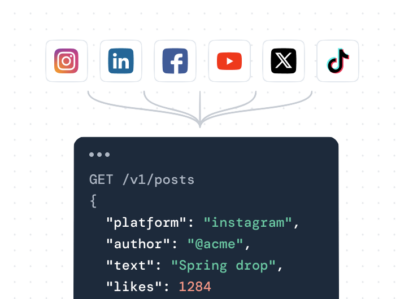

If you’re looking for the best Walls.io alternative, the short answer is: Juicer.io.
Juicer.io is the best overall choice for most businesses, especially if you want a powerful social media aggregator without the heavy pricing structure. Compared to Walls.io’s feature-rich but higher-cost platform, Juicer.io delivers flexible source aggregation, strong moderation controls, broad network support, and simpler pricing that scales more predictably. It’s easier to set up, easier to manage day to day, and better suited for teams that want reliable social walls and UGC feeds without enterprise-level overhead.
That said, the “best” alternative can still depend on your main use case.
Some tools are better for low-cost basic embeds, while others focus on advanced event displays or highly customized walls.
In this guide, we compare five Walls.io alternatives side by side to show which tools fit specific needs (like tight budgets, single-network network feeds, or event use) so you can choose based on value, not just features.
1. Juicer.io

Juicer.io makes it simple to aggregate and display social media content from multiple platforms, offering a clean and branded feed as a reliable walls.io alternative.
With real-time updates, essential moderation tools, and customizable designs, it helps businesses showcase curated social content with minimal effort.
Trusted by over 200,000 customers and processing more than 1 million posts monthly, Juicer.io delivers content that reaches over 100 million viewers every month.
Juicer.io’s top features
- Powerful moderation & filtering tools: curate feeds with approval controls and content filters
- Easy embedding anywhere: one-line script embed plus full WordPress plugin support
- Real-time automatic updates: feeds refresh continuously across connected social accounts and hashtags
- Customizable social wall design: flexible themes and layout options for branded, tailored social feeds
- Lightweight & affordable: fast-loading embeds with flexible, budget-friendly pricing plans
Juicer.io’s pricing

Juicer.io offers a free plan with basic aggregation and a simple feed embed for sites. Paid tiers – Lite, Starter, Pro, and Enterprise – unlock more sources, advanced moderation/filters, custom branding removal, and faster refresh rates, with features scaling by plan level.
Annual subscriptions are available at discounted rates (saving 10% vs monthly) for users who pay yearly rather than month‑to‑month.
Juicer.io’s pros and cons
✅ Very easy setup and embedding – supports both a WordPress plugin and simple embed code, with a quick three-step setup process
✅ Strong moderation workflow – dashboard-based moderation and filtering tools make it straightforward to curate what appears in feeds
✅ Robust free forever plan available – offers a forever-free tier for basic use, making it accessible for small sites and early testing
❌ Free and lower-tier plans are limited – affordable plans may have restricted sources, ads, and fewer customization and filtering features unless you upgrade; API access is enterprise-only
2. Curator.io

Curator.io is a versatile Walls.io alternative that pulls content from multiple social platforms into a single, customizable feed. Its moderation tools and easy embedding make it an ideal tool for teams looking for other options.
Curator.io’s top features
- Flexible moderation workflows: supports both auto-moderation and manual approval controls for user generated content
- Strong customization options: no-code visual editor plus full CSS control for advanced styling
- Embed anywhere + developer access: works on websites, apps, and digital signage, with REST API support
- Beginner-friendly and accessible: simple UI, lightweight embed code, and a free plan for basic use cases
Curator.io’s pricing
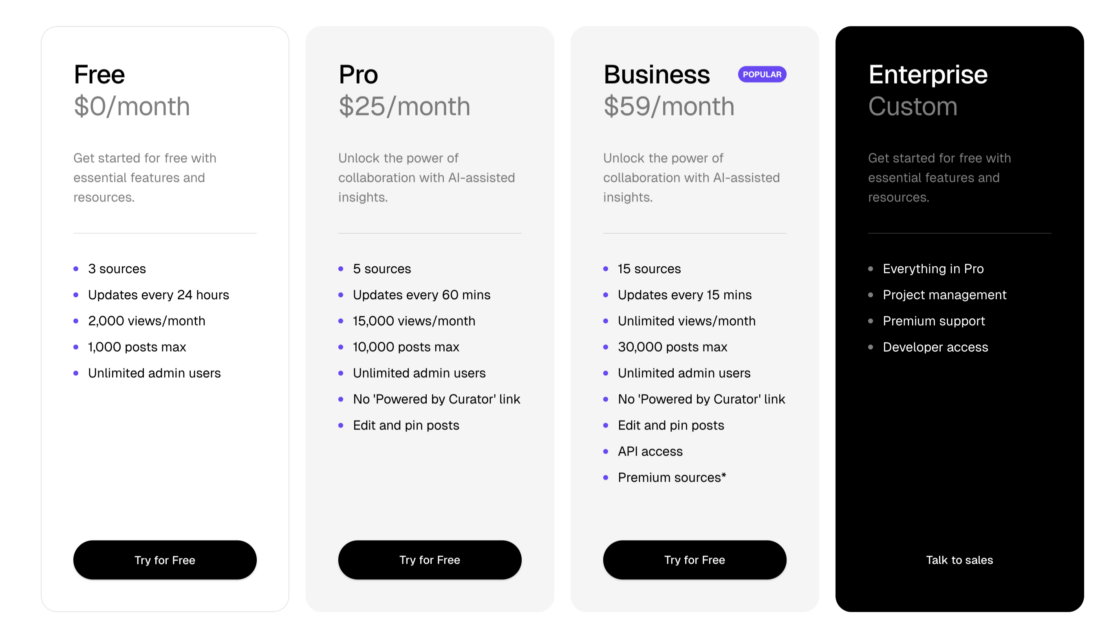
Curator.io offers a Free plan with basic aggregation (3 sources, 24 hour refresh, limited views) for starters.
The professional plans start with the Pro plan ($25/month) which adds more sources, faster updates, editing, and removes branding, while the Business plan ($59/month) expands to even more sources, frequent refreshes, unlimited views, and API access. For larger needs, a custom Enterprise pricing tier adds tailored features, support, and project management options.
Curator.io’s pros and cons
✅ Strong ease-of-use with flexibility – widely praised for its intuitive interface and fast setup while still offering solid customization options
✅ Generous free plan – includes essential features and embeds with no branding, which is uncommon among similar tools
✅ Good content control & clean output – moderation tools and display options make it well suited for teams that want tightly curated, ad-free social feeds
❌ Advanced features gated to higher tiers – capabilities like expanded team access and longer data retention require more expensive plans
❌ Integrations could be deeper – some users report wanting better or broader integrations with other software tools
3. Tagembed

As a leading Walls.io alternative, Tagembed lets you combine social feeds, customer reviews, and stories into one dynamic display.
With advanced moderation, auto-refreshing content, and fully customizable layouts, it’s designed to engage audiences across websites, events, and social media platforms.
Tagembed’s top features
- Multi-source social & review aggregation: combines social feeds, customer reviews, and social stories into one wall
- Advanced moderation & filtering: strong post control tools to approve, block, and refine displayed content
- Deep visual customization: flexible layouts, themes, and full custom CSS/branding options
- Auto-updating feeds: walls refresh automatically to keep content current
- Wide integration support: works across websites, event displays, and direct posts, with built-in analytics for performance tracking
Tagembed’s pricing
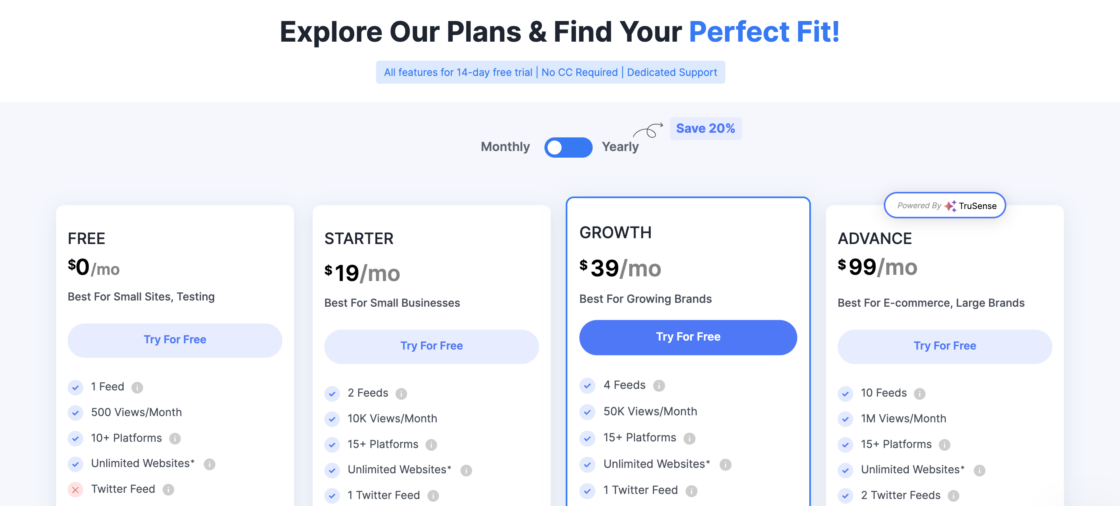
Tagembed offers a free plan that lets you embed one social feed from 10+ platforms with basic moderation and limited views, ideal for small sites and testing.
Paid plans start with a Starter/Growth option ($19–$39/month) that increases feed counts, refresh frequency, views, and adds automatic moderation and CDN performance. For larger brands, the Advance tier ($99/month) expands to more feeds, faster updates, shoppable widgets, high monthly views, and priority support, with a 14‑day free trial available.
Tagembed’s pros and cons
✅ Easy to use and integrate – Users praise the simple setup and seamless integration with WordPress and other platforms.
✅ Responsive customer support – Quick, helpful support resolves issues like copyright concerns or feed setup.
✅ Effective content display – Capable of highlighting key content like five-star reviews and multiple social feeds in a visually appealing way.
❌ Limited feed allowances on lower plans – Some users wish they could connect more sources per account.
❌ Pricing concerns – Higher-tier plans may feel expensive for smaller users or those needing more feeds.
❌ Lack of detailed tutorials – Users note that more examples or guidance would help maximize customization and advanced features.
4. Flockler

Flockler aggregates social media posts and reviews into a customizable, shoppable feed with flexible layouts and multi-channel embedding, making it a powerful Walls.io alternative for teams needing a polished, easy-to-manage social wall.
Flockler’s top features
- Shoppable UGC features: supports shoppable user-generated content feeds and built-in review collection forms
- Flexible display layouts: ready-made grid, carousel, and collage layouts for different use cases
- Easy multi-channel embedding: quick embed options for websites and digital signage displays
- API, analytics & rights management: developer API access plus built-in performance analytics and content rights controls
Flockler’s pricing
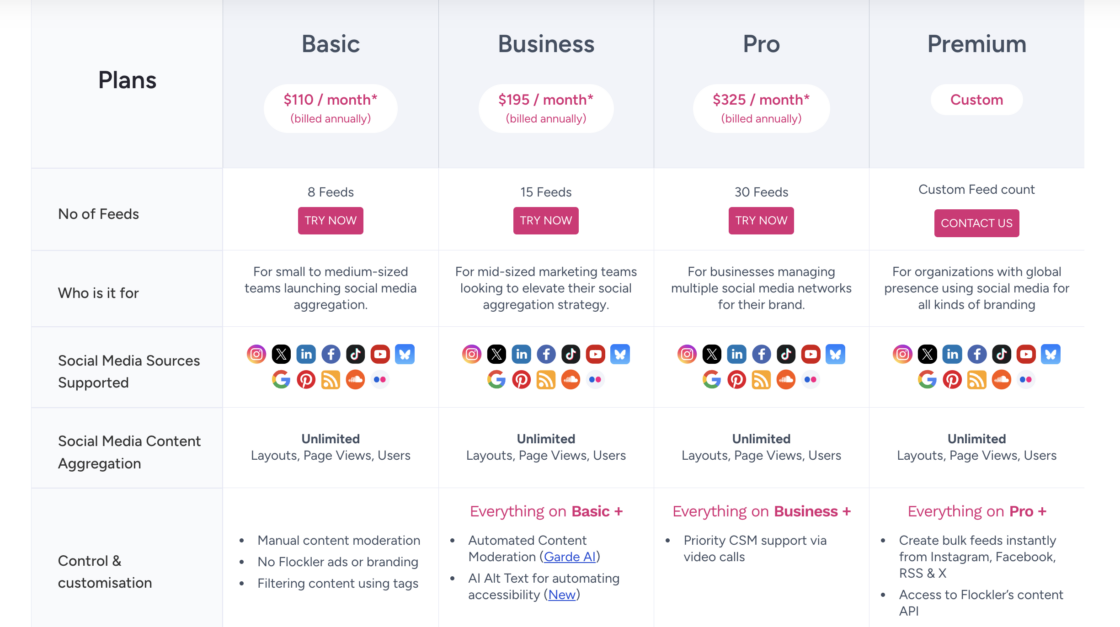
Flockler offers tiered monthly plans starting with Basic for small–mid teams ($110/month) with up to 8 social feeds, Business with automated moderation and AI tools, and Pro with more feeds and API access.
Premium and enterprise options provide custom feed counts and advanced features for larger organizations, with a 14‑day free trial available. Plans scale by the number of live feeds and include unlimited layouts, users, and embeds across platforms.
Flockler’s pros and cons
✅ Smooth setup and day-to-day usability – users frequently highlight the straightforward onboarding and user-friendly interface, even for non-technical teams
✅ Highly flexible display control – feed visuals and moderation settings are easy to tailor, with multiple layout variations created in just a few clicks
✅ Reliable automation – live feeds update automatically with minimal manual work
❌ Higher price point than many alternatives – cost can be a barrier for smaller teams or simple use cases
❌ Analytics depth is limited – several users find reporting and metrics too basic compared to more data-focused platforms
❌ Interface and management friction in places – some UI areas feel dated, layout lists can become cluttered, and multi-account access control can be harder to manage than expected
5. Smash Balloon

Smash Balloon lets you quickly create responsive, multi-platform social feeds on WordPress with no coding required, making it a user-friendly walls.io alternative for embedding Instagram, Facebook, Twitter, and YouTube content.
Smash Balloon’s top features
- No-code WordPress social feed plugin: create and display social feeds in a few clicks with no coding required
- Multi-platform feed support: integrates Instagram, Facebook, X/Twitter, and YouTube feeds individually or together in a social wall
- Platform-specific feed features: includes Facebook Events & Reviews feeds, hashtag-filtered Instagram feeds, Twitter carousels, and live YouTube video feeds
- Responsive, device-friendly design: feeds automatically adapt to mobile, tablet, and desktop layouts
Smash Balloon’s pricing

Smash Balloon offers individual annual licenses for its social feed plugins (e.g., Facebook, Instagram, Twitter, YouTube), typically starting around $49–$199 per year per plugin, with more advanced features in higher tiers.
For broader needs, the All Access Bundle paid plan provides unlimited use of all Smash Balloon plugins on any number of websites for one yearly price ($299/year), including priority support and access to all future products. A 30-day refund policy is included so you can try the plugin risk-free before committing.
Smash Balloon’s pros and cons
✅ Very easy for non-technical users – widely praised for simple setup and configuration, with no coding required to get feeds live
✅ Strong WordPress integration – works seamlessly inside WordPress sites and fits well into existing themes and page builders
✅ Flexible visual customization – users like the range of display and styling options to match brand look and layout needs
❌ WordPress-only for key feeds – Facebook feed functionality is limited to WordPress sites, so it’s not suitable for apps or non-WP platforms
❌ No free plan and feature tier limits – important features (templates, filtering, reviews) are restricted to higher-priced plans
❌ Potential performance impact – some users report slower page load times when running it alongside many other plugins