
What we’re building
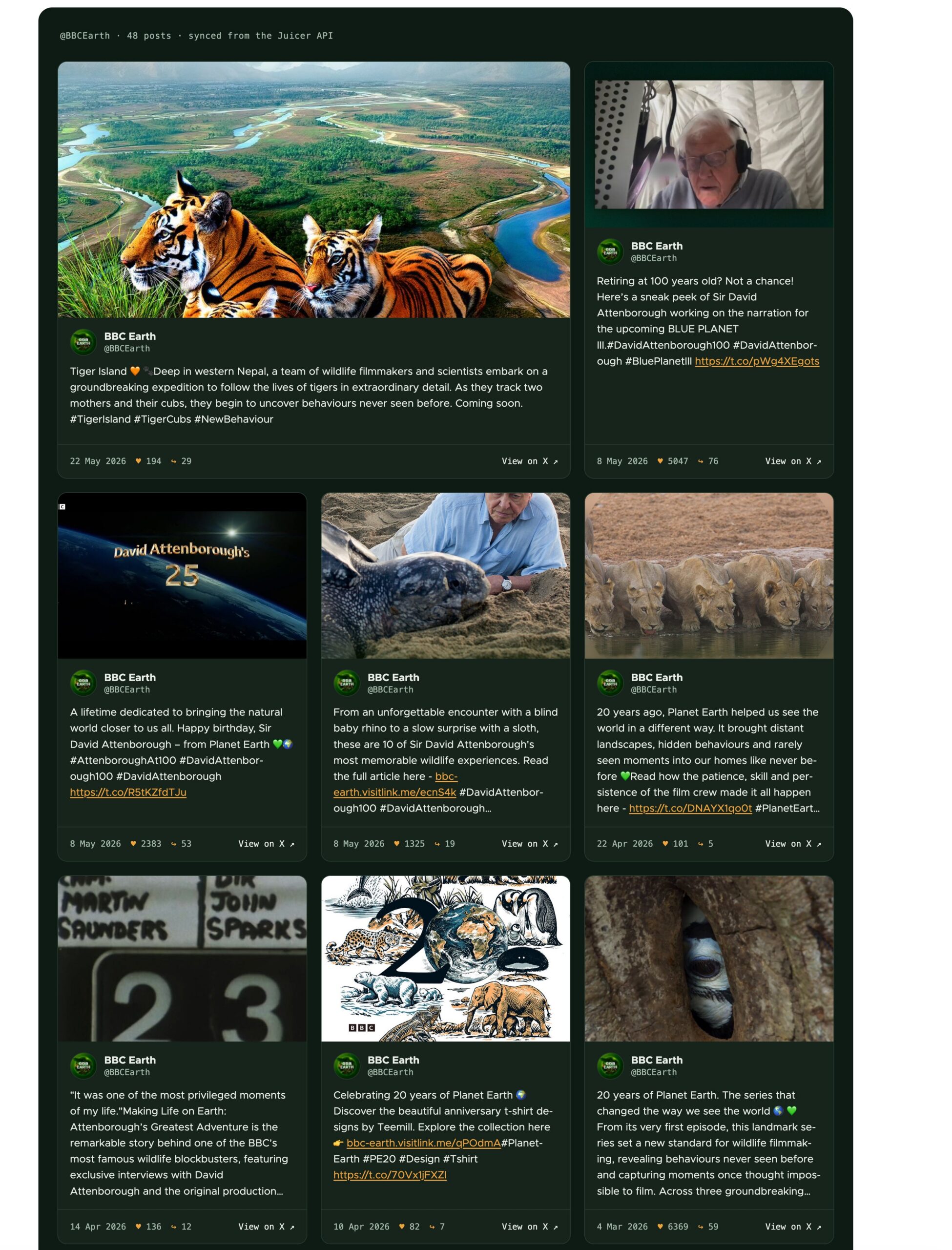
A Drupal site that automatically mirrors a brand’s X (Twitter) posts as first-class Drupal content. BBC Earth’s posts flow from X into Juicer, from Juicer’s API into social_post nodes, and onto a styled card-grid page – with no manual work after setup.
See it live: juicerfeed.com – a live example of this integration, running on a small VPS. It re-syncs from the Juicer API every hour, so the posts you see are whatever BBC Earth last published.
Video Overview: https://cleanshot.com/share/pqfZNMJlY3fHSZWR2MTQ
Why nodes instead of a JS embed? Once posts are real Drupal entities you get Views, search indexing, permissions, custom rendering, editorial workflows – in short, the whole Drupal toolbox.
The pipeline has two independent sync layers:
X (Juicer's own workers, per feed sync rate) -> Juicer
Juicer API (our cron module, hourly) -> Drupal nodes
Drupal View (cache tags, automatic) -> /bbc-earth page
Prerequisites
- A Drupal 10.3+ / 11 site – this guide used 11.4.4 on DDEV, PHP 8.3
- A Juicer account and API key generated at – juicer.io
-
drush13
Part 1 – Juicer: one feed, one X source
Everything downstream needs exactly one thing from Juicer: a feed with an X source in it. In the spirit of this guide we’ll create it with two API calls – that said, the dashboard UI works just as well (see the aside below).
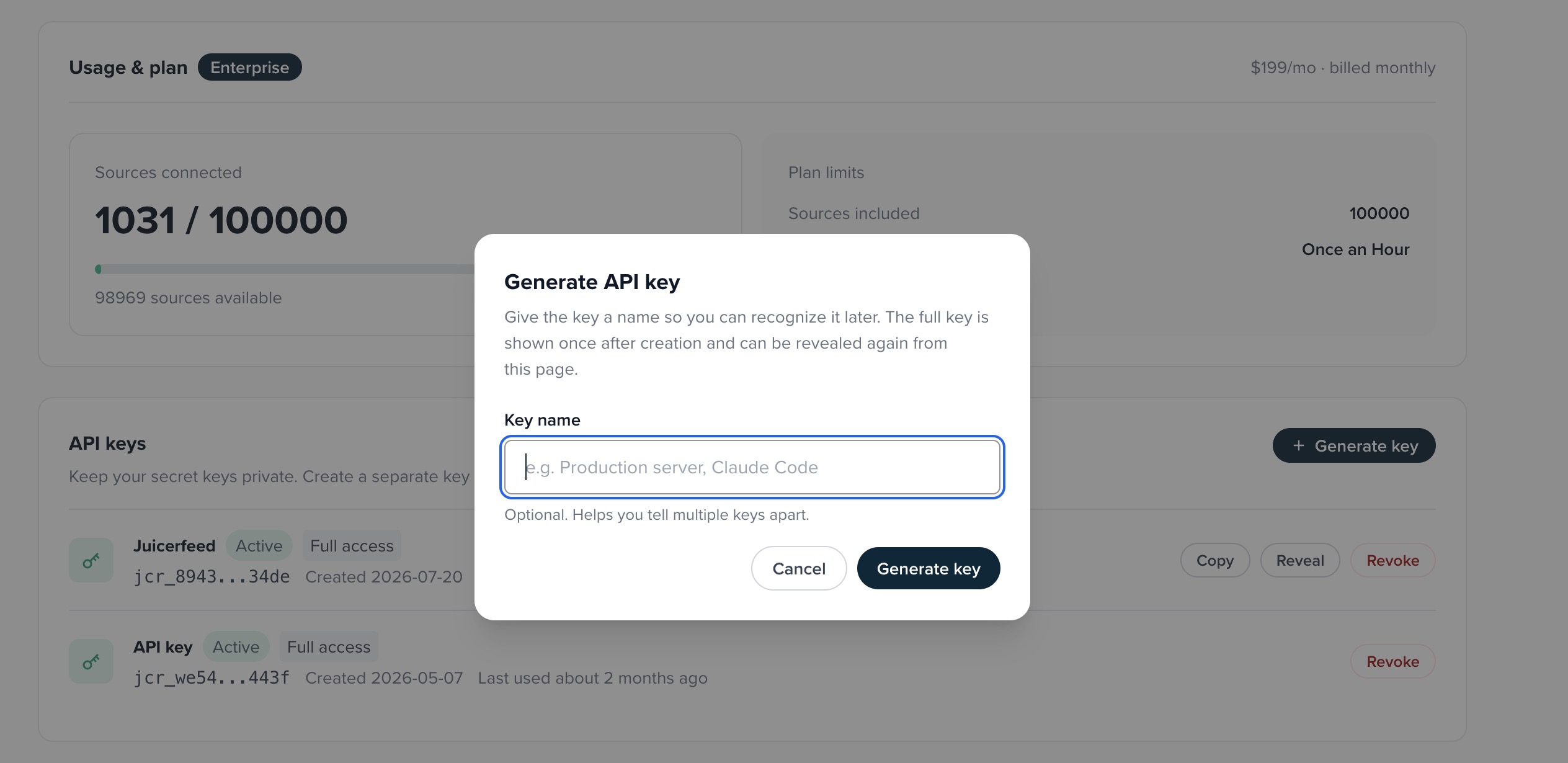
First, get an API key: in the Juicer dashboard, open the API page and generate a key. All Integration API requests authenticate with it as a Bearer token. The Juicer API docs cover authentication and every endpoint in detail.
Create the feed
curl -X POST https://api.juicer.io/v1/feeds \
  -H "Authorization: Bearer $JUICER_API_KEY" \
  -H "Content-Type: application/json" \
  -d '{"name": "BBC Earth X"}'
The response contains two identifiers you’ll use for different things:
{ "data": { "id": 123456, "name": "BBC Earth X", "slug": "bbc-earth-x", "...": "..." } }-
id– addresses the feed on the authenticated Integration API (/v1/...), like the next call. -
slug– auto-generated from the name. This guide addresses the feed byidthroughout, but the slug is the feed’s readable handle in the dashboard and in Juicer’s embed URLs, so a good feed name earns you a good slug for free.
Add the X source
curl -X POST https://api.juicer.io/v1/feeds/123456/sources \
  -H "Authorization: Bearer $JUICER_API_KEY" \
  -H "Content-Type: application/json" \
  -d '{"platform": "Twitter", "term": "bbcearth", "term_type": "username"}'
Then, Juicer starts pulling posts immediately. Two things to know:
- The platform is
"Twitter"even though the product is X today –GET /v1/platformslists every valid platform + term_type combination. - Plan limits apply on the API exactly as in the UI: a maxed-out account gets a
feed_limit_reachederror on feed creation, and adding a source can returninsufficient_creditson API-credit accounts.
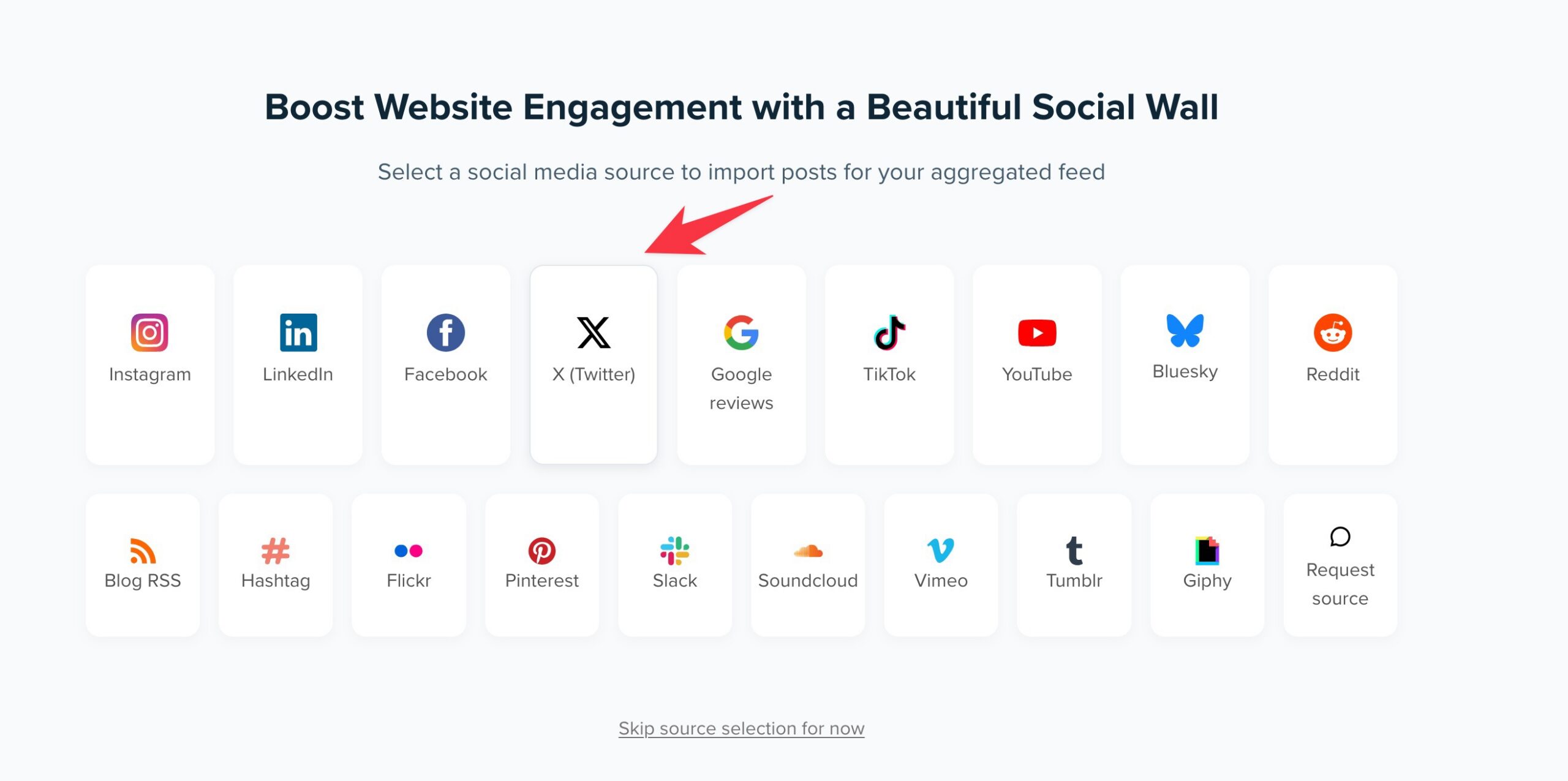
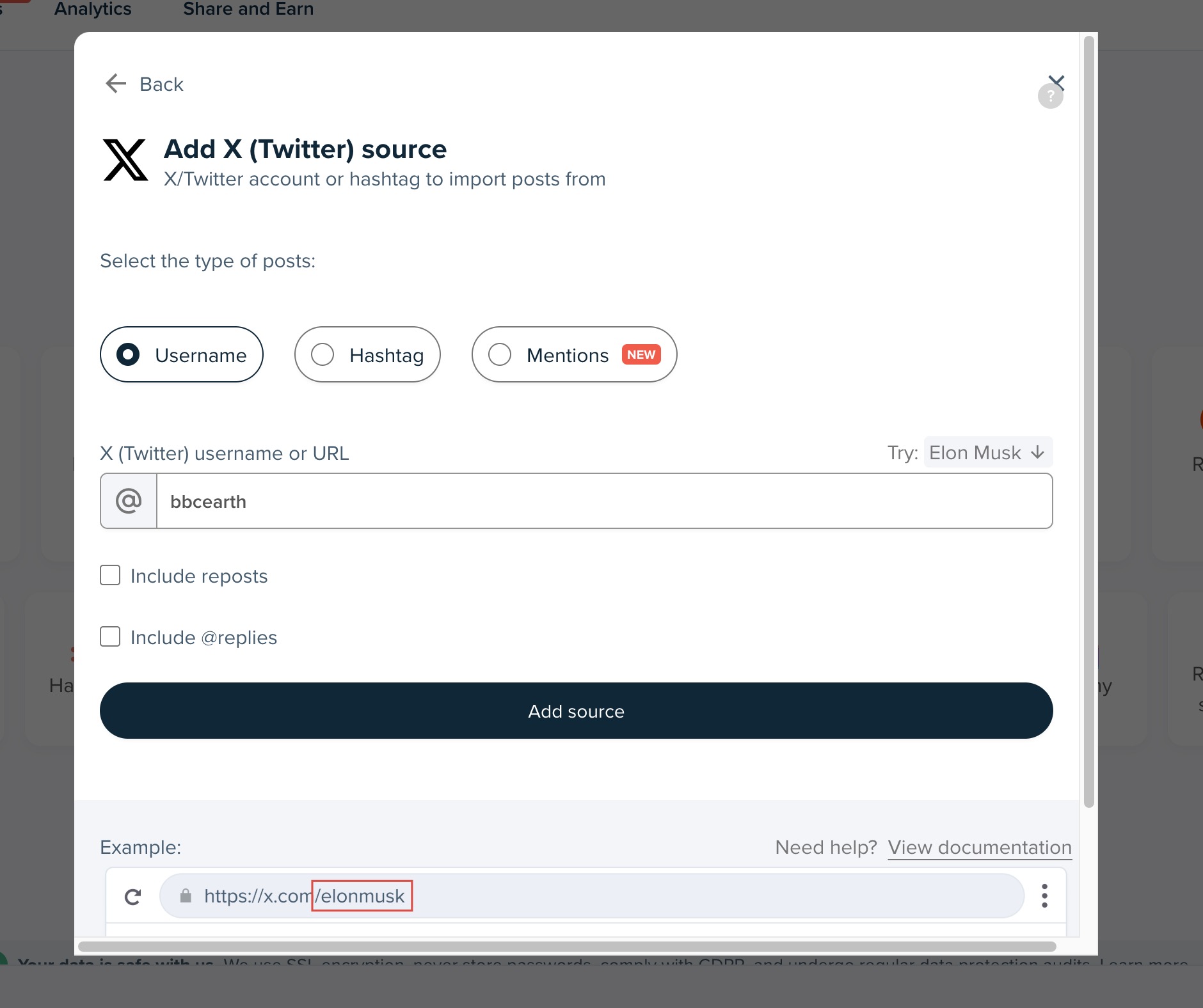
Prefer clicking? The Juicer dashboard does the same job. Click + New feed, pick X (Twitter) from the source-type grid, choose Username and enter bbcearth. Then rename the feed – pencil icon next to the name, set “BBC Earth X”, tick “Also update the feed’s URL” – so the auto-generated slug becomes a friendly bbc-earth-x.
Mind the feed’s sync rate
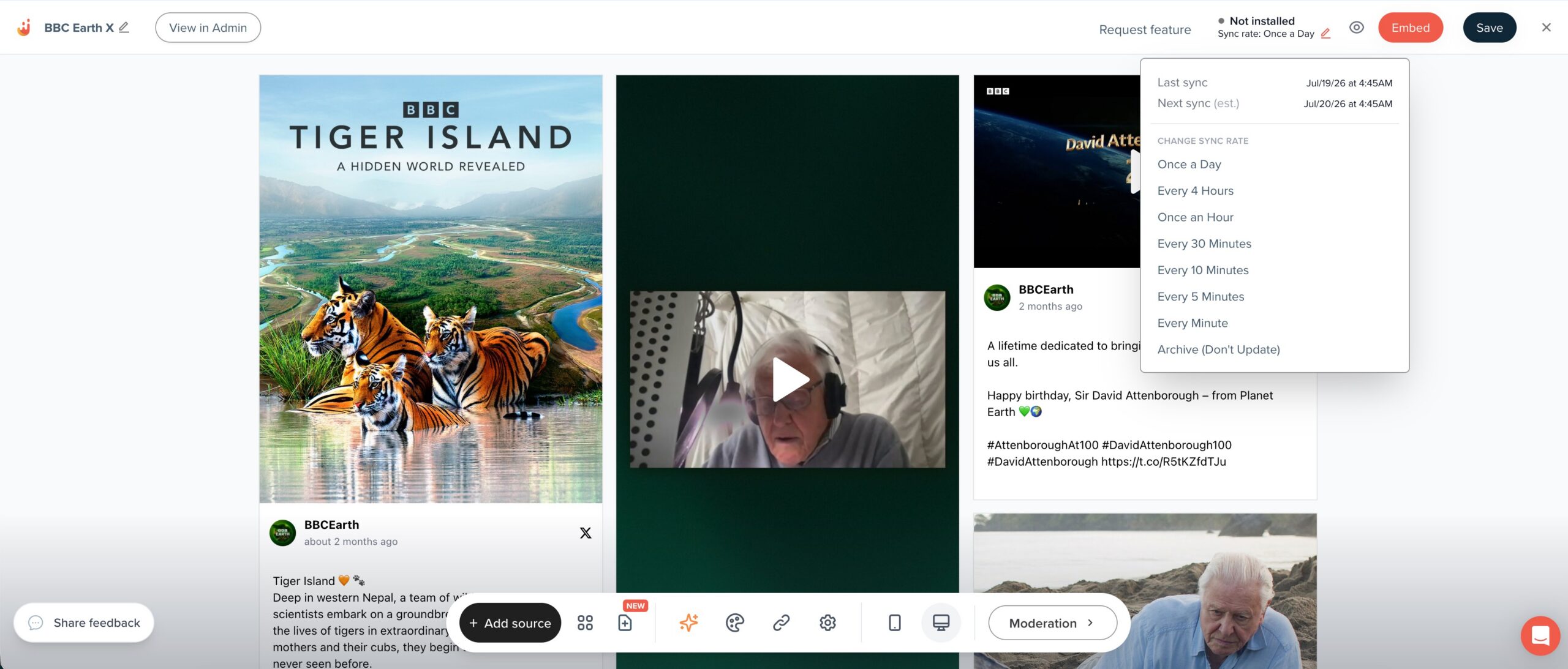
However you created it, note the sync rate in the feed header – e.g. “Once a Day”. That’s how often Juicer pulls new posts from X, and everything downstream can only ever be as fresh as it – the hourly Drupal cron in Part 7 cannot invent posts Juicer hasn’t fetched yet.
That rate isn’t fixed: it comes from your Juicer plan, and you can change it. At the time of writing, Free and Ad-Free feeds sync once a day, Mini Lite, Lite and Starter once an hour, and Pro every 10 minutes. On Team, Enterprise and Custom plans – and on paid API accounts – you can also override it per feed from the pencil beside the sync rate in the feed header, anywhere from every minute up to once a day, or set the feed to Archive so it stops updating altogether.
So if the posts ever look stale, check the plan and the feed’s sync rate before you go looking for a bug in the code.
Part 2 – Reading the feed through the Integration API
The key from Part 1 does double duty: the same Bearer token that created the feed also reads its posts. Everything below runs against the versioned Integration API, documented in the Juicer API reference.
curl -H "Authorization: Bearer $JUICER_API_KEY" \
  "https://api.juicer.io/v1/feeds/123456/posts?per_page=50&page=1"
Note the feed is addressed by the numeric id from Part 1, not the slug. If you built your feed in the dashboard and only know its slug, GET /v1/feeds lists your feeds with both ids and slugs, and GET /v1/feeds/{id}?include=sources returns a single feed’s details and its sources. Neither of those returns posts – that is this endpoint’s job.
The response shape
{
  "data": [
    {
      "id": 1284419901,
      "external_id": "2057823941054615950",
      "platform": "X (Twitter)",
      "url": "https://x.com/BBCEarth/status/2057823941054615950",
      "message": "Tiger Island 🧡 🐾\n\nDeep in western Nepal…",
      "external_created_at": "2026-05-22T07:00:34.000-07:00",
      "poster": {
        "display_name": "BBC Earth",
        "name": "BBCEarth",
        "url": "https://x.com/BBCEarth",
        "image": "https://www.juicer.io/api/posts/…/poster_images.jpg"
      },
      "media": [
        {
          "type": "image",
          "url": "https://www.juicer.io/api/media/32722190?s=…",
          "preview_image_url": null,
          "alt_text": null
        }
      ],
      "like_count": 188,
      "comment_count": 24,
      "share_count": 31,
      "moderation_status": "public",
      "pinned": false
    }
  ],
  "meta": { "page": 1, "per_page": 50, "total_count": 48, "total_pages": 1 }
}
Gotchas worth knowing
-
Pagination is explicit.
meta.total_pagesandmeta.total_counttell you exactly how far to go, so there is no paging until you hit an empty array.per_pagedefaults to 25 and caps at 100. -
platformis the display name –"X (Twitter)", not an internal identifier. Match on that string. - Metrics are
*_count, and a missing key means “not collected”. X returnslike_count,comment_count,share_count,quote_count,bookmark_countandimpression_count; a platform that doesn’t collect one omits it rather than reporting a misleading zero. Check witharray_key_exists, not?? 0, if the distinction matters to you. -
messageis plain text, not HTML. That suits Drupal: the Restricted HTML format we store it in runsfilter_autop, which turns the line breaks into paragraphs, andfilter_url, which linkifies the bare t.co URLs. -
Media is an array. Images carry
url; videos carrypreview_image_urlfor the thumbnail, alongside width, height andalt_textwhere the platform supplies them. Media URLs are Juicer-proxied and hotlinkable. -
moderation_statusrides along on every post, and status defaults topublic– so anything you moderated away in Juicer stays out of Drupal without any extra work on your side.
Part 3 – The Social Post content type in Drupal
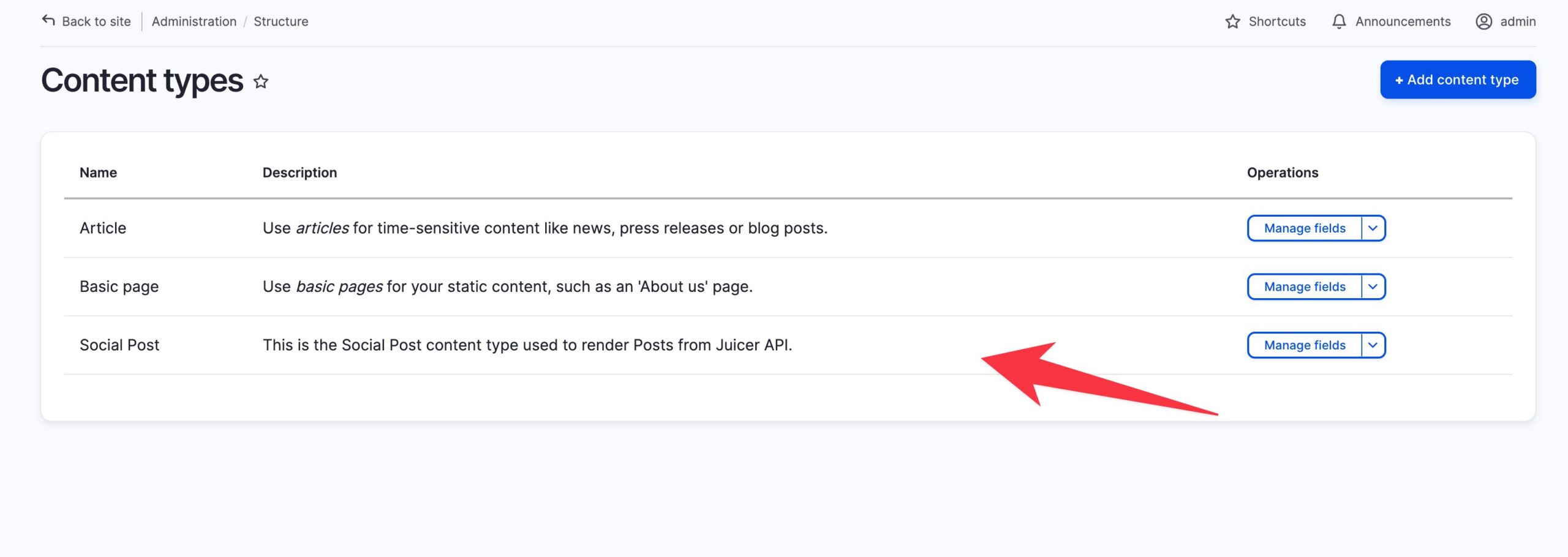
First, in your Drupal site create a plain content type – no custom entity code needed. Structure → Content types → Add content type: name Social Post, machine name social_post. Uncheck “Promoted to front page” in publishing options.
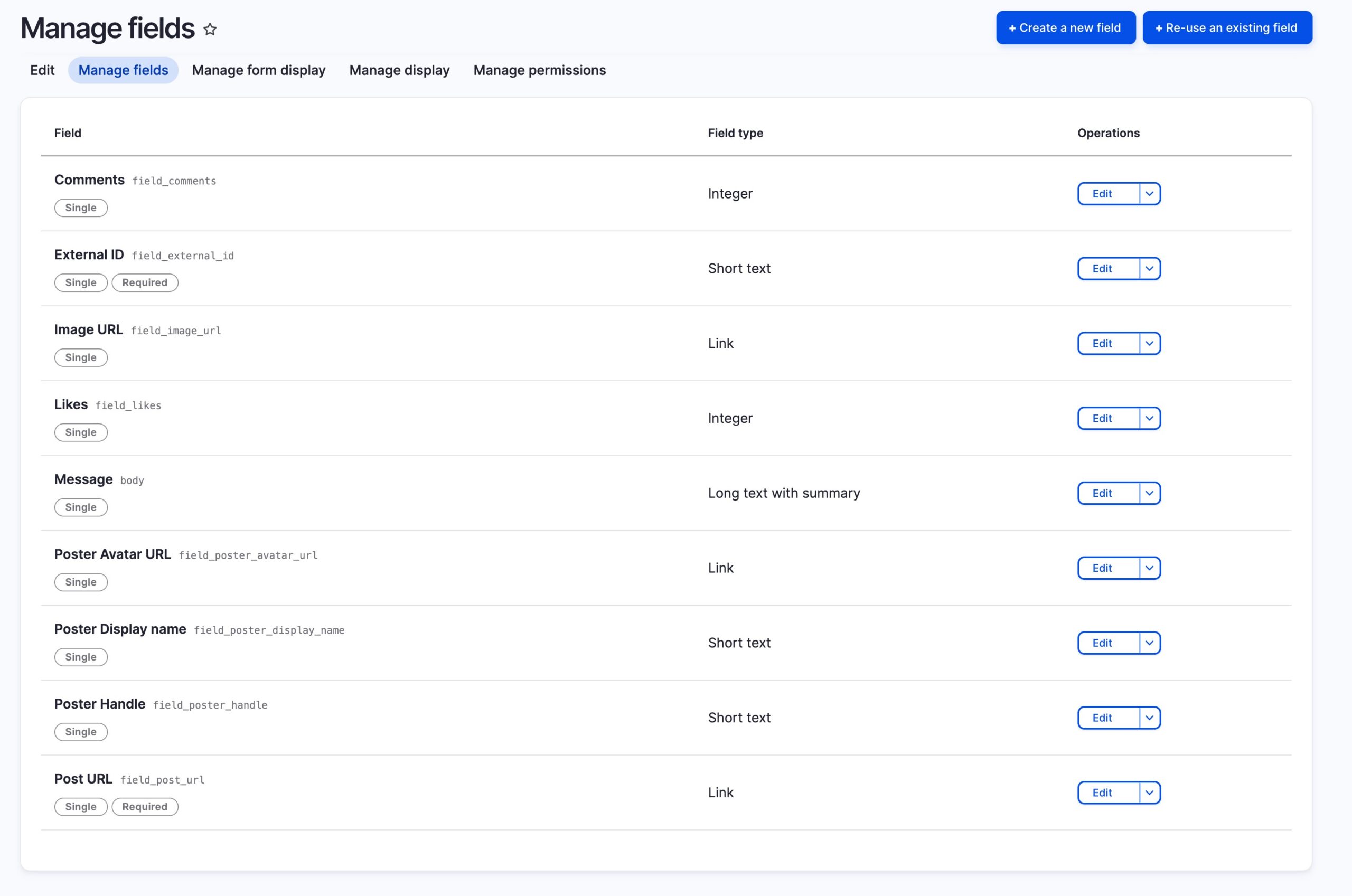
Then add fields under Manage fields:
| Label | Machine name | Type | Notes |
|---|---|---|---|
| External ID | field_external_id |
Text (plain) | Required – the tweet id, our dedupe key |
| Post URL | field_post_url |
Link | Required – permalink on X |
| Image URL | field_image_url |
Link | Post photo, rendered as an image by our template |
| Poster name | field_poster_display_name |
Text (plain) | “BBC Earth” |
| Poster handle | field_poster_handle |
Text (plain) | “BBCEarth” |
| Poster avatar URL | field_poster_avatar_url |
Link | |
| Likes | field_likes |
Number (integer) | |
| Comments | field_comments |
Number (integer) |
Three built-ins do double duty, saving three custom fields:
- Title → set by the sync to “BBC Earth – 22 May 2026” – nodes must have one anyway
-
Body → the post’s message. v1 hands this over as plain text, so we store it with the Restricted HTML format and let Drupal do the formatting:
filter_autoprebuilds the paragraphs andfilter_urlturns the bare t.co URLs back into links on output - Authored on (created) → set to the post’s original X publish time, so date sorting and display need zero extra fields
If your content type is missing Body, attach it programmatically:
// drush php:eval
$type = \Drupal\node\Entity\NodeType::load('social_post');
node_add_body_field($type, 'Message');
Part 4 – The sync service
All sync logic lives in one autowired service. It pages through the API, keeps only X posts, and upserts by field_external_id – new tweets become nodes, existing ones are updated only when something actually changed (likes, comments, text, image) – in short, everything else is untouched.
The service reads two things from its environment: JUICER_API_KEY, the Bearer token from Part 1, and JUICER_FEED_ID, the numeric feed id. Both are required. As a result, the service throws when either is missing – an absent key would otherwise look exactly like a feed with no posts, and the sync would quietly report zero rather than telling you it was never authenticated. Keep the key out of the repo: on the demo site it lives only in the container’s env file.
web/modules/custom/social_post_sync/src/SocialPostSyncService.php – the core of it:
public function sync(): array {
  $storage = $this->entityTypeManager->getStorage('node');
  $result = ['created' => 0, 'updated' => 0, 'unchanged' => 0, 'skipped' => 0];

  for ($page = 1; $page <= self::MAX_PAGES; $page++) {
    ['data' => $items, 'meta' => $meta] = $this->fetchPage($page);

    foreach ($items as $item) {
      if (($item['platform'] ?? '') !== self::PLATFORM) {
        $result['skipped']++;
        continue;
      }
      $values = $this->nodeValuesFor($item);
      $existing = $storage->loadByProperties([
        'type' => 'social_post',
        'field_external_id' => $values['field_external_id'],
      ]);
      if ($existing === []) {
        $storage->create($values)->save();
        $result['created']++;
        continue;
      }
      $this->updateIfChanged(reset($existing), $values)
        ? $result['updated']++ : $result['unchanged']++;
    }

    if ($page >= $meta['total_pages']) {
      break;
    }
  }
  return $result;
}
A thin drush script – scripts/sync_social_posts.php – triggers it manually:
$result = \Drupal::service(SocialPostSyncService::class)->sync();
printf("Sync finished: %d created, %d updated, %d unchanged, %d skipped.\n", ...);
First run vs. second run – the upsert proof:
$ ddev drush php:script scripts/sync_social_posts.php
Sync finished: 48 created, 0 updated, 0 unchanged, 0 skipped (non-X).
$ ddev drush php:script scripts/sync_social_posts.php
Sync finished: 0 created, 0 updated, 48 unchanged, 0 skipped (non-X).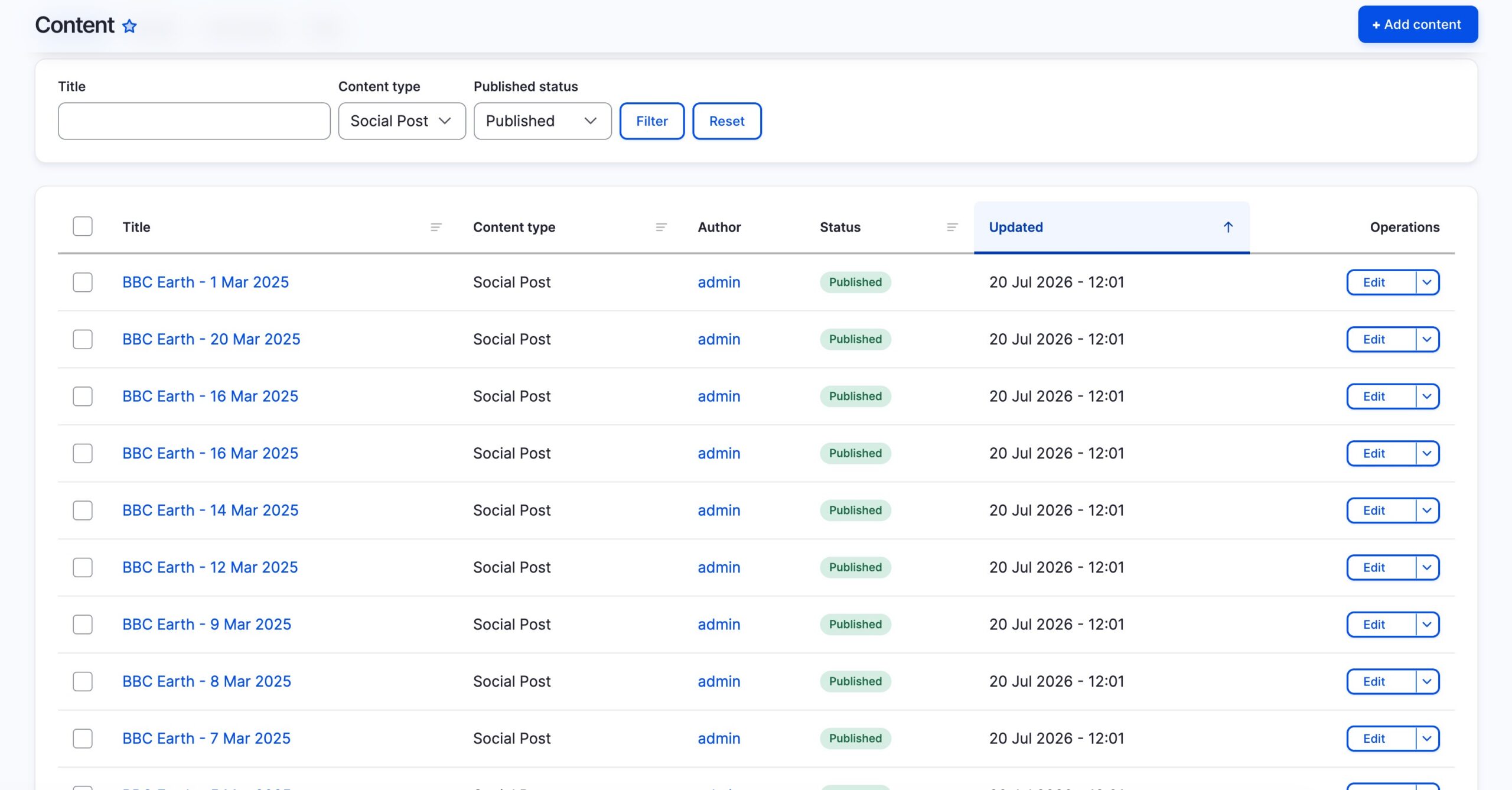
Part 5 – The listing page: a View
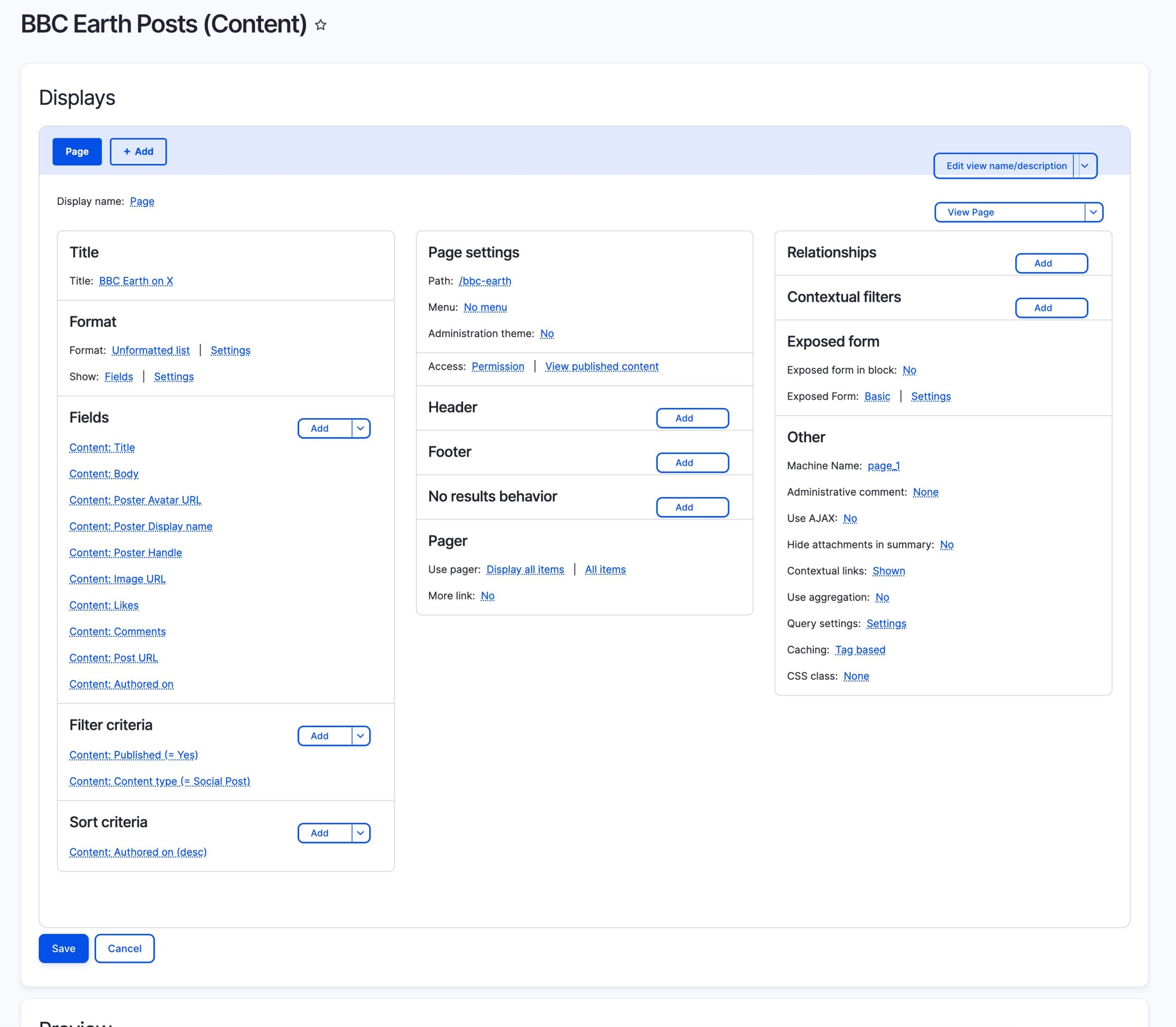
Structure -> Views -> Add view: show Content, create a page – e.g. at /bbc-earth – then adjust:
- Filter on the bundle! The wizard can leave this out – add Content type = Social Post or the page will happily list your Basic pages too.
- Row style: Fields, not rendered entity – the card template needs individual values.
- Add the fields: Body, Post URL, Image URL, Poster name, Poster handle, Poster avatar URL, Likes, Comments, Authored on.
- Sort: newest first on Authored on – which is the X publish time thanks to Part 3.
- Pager: your call; we show all.
Part 6 – Making it beautiful
An Olivero subtheme carries the whole design – no page builder, no build step, ~700 lines of plain CSS across three files, two small JS files and two Twig overrides:
web/themes/custom/juicer_social/
├── juicer_social.info.yml          # base theme + regions + global library
├── juicer_social.libraries.yml     # social-cards, site-header, post-reel
├── logo-juicer-drupal-v2.svg       # Juicer mark + Drupal drop lockup
├── css/
│   ├── social-cards.css            # the card grid
│   ├── site-header.css             # Juicer chrome: header, nav, footer
│   └── post-reel.css               # the full-screen post viewer
├── js/
│   ├── post-reel.js                # post viewer behaviour
│   └── post-links.js               # in-post links open in a new tab
└── templates/
    ├── views-view-unformatted--bbc-earth-posts.html.twig   # grid + viewer dialog
    └── views-view-fields--bbc-earth-posts.html.twig        # one card
The grid wrapper attaches the library, renders an eyebrow line, and features the newest post at double width:
{{ attach_library('juicer_social/social-cards') }}
<div class="bbc-earth-canopy">
<p class="bbc-earth-canopy__eyebrow">@BBCEarth · {{ rows|length }} posts · synced from the Juicer API</p>
<ul class="social-card-grid">
{% for row in rows %}
<li class="social-card{{ loop.first ? ' social-card--featured' }}">{{ row.content }}</li>
{% endfor %}
</ul>
</div>The card template reads raw values straight off the row’s entity – cleaner than fighting field formatters:
{% set post = row._entity %}
<article class="social-card__inner">
{% if post.field_image_url.uri %}
{# Opens the post viewer; the footer link is the only route off-site. #}
<button type="button" class="social-card__media social-card__open"
aria-label="Open post from {{ posted|date('j M Y') }} in the post viewer">
<img src="{{ post.field_image_url.uri }}" alt="" loading="lazy">
</button>
{% endif %}
...
<footer class="social-card__meta">
<time datetime="{{ post.created.value|date('Y-m-d') }}">{{ post.created.value|date('j M Y') }}</time>
<span><span aria-hidden="true">♥</span> {{ post.field_likes.value }}<span class="visually-hidden"> likes</span></span>
<a href="{{ post.field_post_url.uri }}" target="_blank" rel="noopener noreferrer">
View on X<span class="visually-hidden">, post from {{ posted|date('j M Y') }}, opens in a new tab</span> <span aria-hidden="true">↗</span>
</a>
</footer>
</article>Design notes: dark forest-green panel so the wildlife photography leads; a responsive grid that steps 1 -> 2 -> 3 columns with the newest post spanning two; one amber accent reserved for links; engagement data in a monospace “field log” strip; prefers-reduced-motion respected; visually-hidden labels on the stats for screen readers.
Clicking a post: the viewer
The card image is a <button>, not a link, and it opens every post in a full-screen viewer that snap-scrolls one post per screen – the reading pattern people already know from Reels and Stories. “View on X” in the card footer stays the only route off-site, so browsing the feed no longer dead-ends on someone else’s domain.
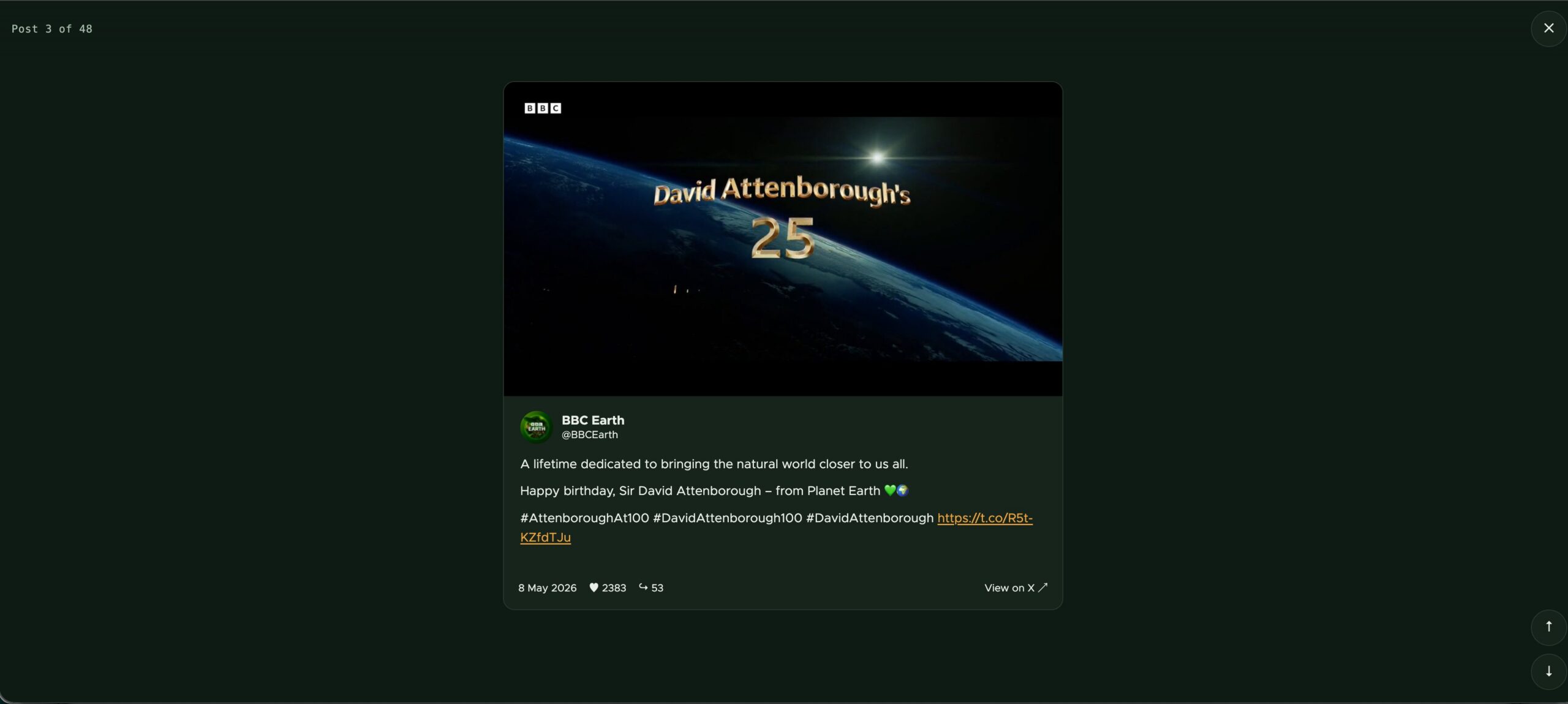
Two decisions did most of the work:
-
A native
<dialog>.showModal()gives focus trapping, inertness of the page behind, and Esc-to-close from the browser, so none of that is hand-written. The dialog ships empty in the grid template; only its shell is markup. -
The slides are clones of the cards. On first open the JS clones each
.social-card__inner, swapping the trigger button back for the bare<img>– inside the viewer the photo is content, not a control. A post is therefore described in exactly one place. This works because the card only visually clamps its message with-webkit-line-clamp; the full text was in the DOM all along.
Finally, the rest is CSS: scroll-snap-type: y mandatory on the track, scroll-snap-align: start on each slide, and object-fit: contain to undo the card’s 3:2 crop so landscape photography is never cut.
Two traps to avoid
- Use
scroll-snap-align: start, not center. With slides at least a full screen tall, centre alignment lands a neighbour when you jump withscrollIntoView({block: 'start'}). -
behavior: 'auto'does not mean instant – it defers to the CSSscroll-behavior, which here is smooth. Home/End across 48 slides crawled through every one and announced each to the aria-live counter. Multi-slide jumps need'instant'; only single steps should animate.
Also, keyboard parity comes free of the pattern: arrows, PageUp/PageDown and Home/End move between posts, Esc closes and returns focus to the card image you came from, and previous/next buttons give a single-pointer alternative to swiping.
One related touch, in js/post-links.js: the links inside a post body all lead off-site, so they get target="_blank" and rel="noopener noreferrer" too. That has to happen in JS rather than in the markup, because the body renders through Restricted HTML, whose filter_html only permits <a href hreflang> – a target written into the stored HTML would simply be stripped on output, and widening the filter would let any third-party content set its own target.
Enable and switch:
ddev drush theme:install juicer_social
ddev drush config:set system.theme default juicer_social -y
ddev drush cr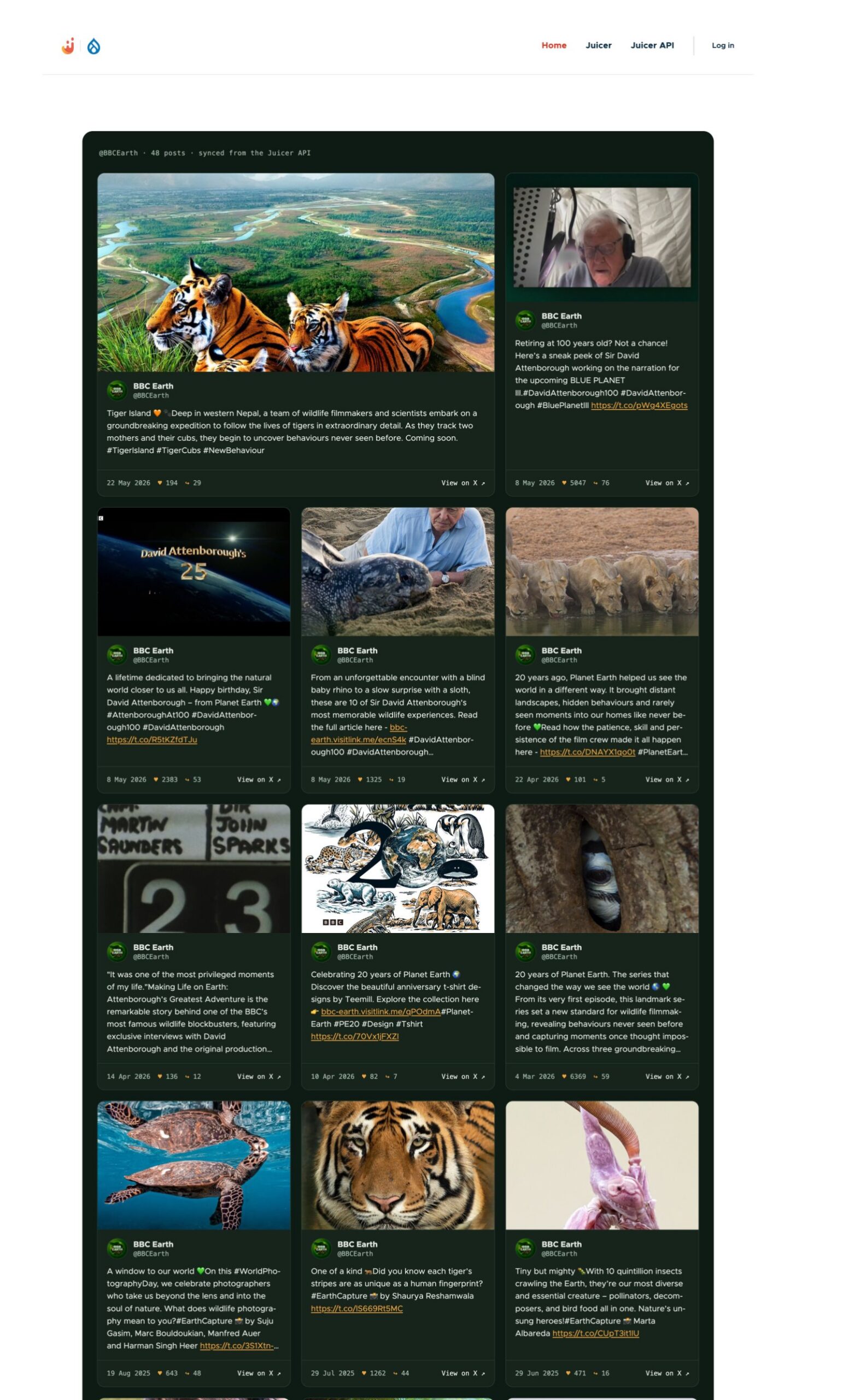
Part 7 – Automating the sync with cron
A tiny module makes the whole thing self-updating. social_post_sync registers the sync service plus one OOP cron hook – Drupal 11 #[Hook] attribute style:
#[Hook('cron')]
public function cron(): void {
  $last_sync = $this->state->get(self::LAST_SYNC_STATE_KEY, 0);
  if ($this->time->getRequestTime() - $last_sync < self::SYNC_INTERVAL_SECONDS) {
    return;
  }
  $logger = $this->loggerFactory->get('social_post_sync');
  try {
    $result = $this->syncService->sync();
    $logger->info('Juicer sync: @created created, @updated updated, @unchanged unchanged, @skipped skipped.', [...]);
  }
  catch (\Throwable $exception) {
    $logger->error('Juicer sync failed: @message', ['@message' => $exception->getMessage()]);
  }
  // Stamp even on failure so a broken API is retried hourly,
  // not hammered on every cron run.
  $this->state->set(self::LAST_SYNC_STATE_KEY, $this->time->getRequestTime());
}
Every Drupal cron run checks a State timestamp; if the last sync is over an hour old it syncs and logs to watchdog. Failures are logged and retried next hour instead of hammering the API.
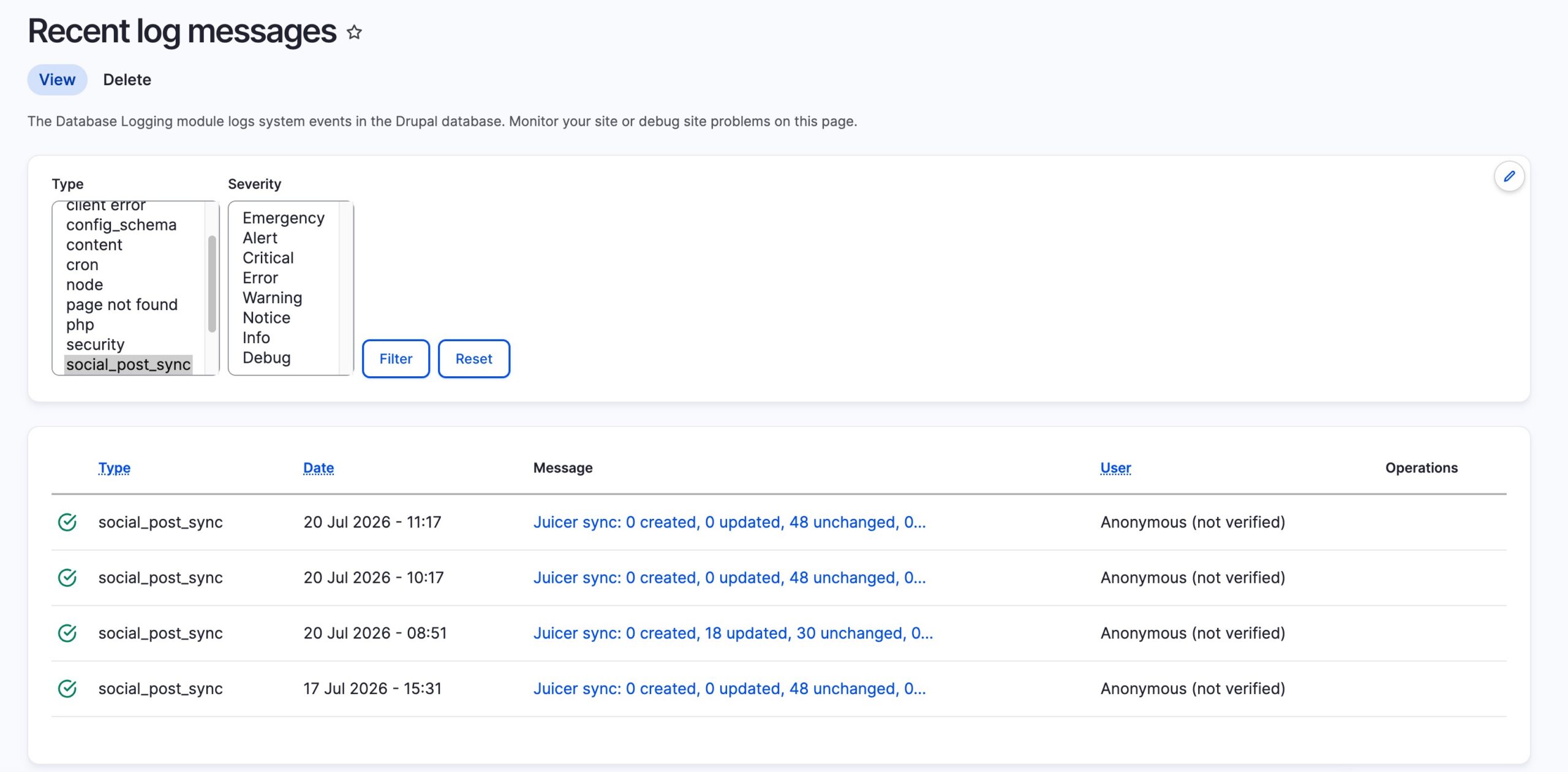
Production note: don’t rely on core’s request-triggered automated_cron – wire real cron (drush cron in crontab, or an external ping of /cron/{key}) so the hourly sync actually happens hourly.
Recap
| Layer | Mechanism | Frequency |
|---|---|---|
| X → Juicer | Juicer’s own sync workers | The feed’s sync rate – set by plan (daily on Free, hourly on Lite/Starter, every 10 min on Pro), set per feed on Team/Enterprise/Custom |
| Juicer → Drupal |
social_post_sync module on cron |
Hourly |
| Drupal → page | View + cache tags | Instant on new content |
In short, zero to hero: one Juicer feed, one API key, one content type, one service, one view, one subtheme, one cron hook.
See it live at: https://juicerfeed.com
Running Drupal? Skip the build with our module
This guide wires the pipeline up from scratch so you get full control over how posts become Drupal entities. If you just want a social feed on your Drupal site without writing a line of code, we maintain an official module: the Juicer Social Feed module for Drupal 10 and 11.
It drops your Juicer feed onto any page as a configurable block – place it in a sidebar, content region or Layout Builder, filter by network, set post limits, and get a responsive masonry grid with post overlays and a “Load More” pager. It works with Instagram, LinkedIn, Facebook, X (Twitter), TikTok, Bluesky and YouTube, no coding required.
Get it from the Drupal project page: drupal.org/project/juicer.