

Adding a live social feed to your website shouldn’t mean sacrificing performance. While social feeds bring authentic content and real-time engagement to your site, they can also add weight that slows things down if not implemented correctly.
The good news? With the right setup, you can have both – a dynamic social feed and fast page loads.
Here’s how to optimize your site speed when hosting live social feeds, from basic settings to working effectively with a development partner.
Why site speed matters with social feeds
Site speed isn’t just about user experience, though that’s critical. Google factors page speed into search rankings, and slow-loading pages directly impact bounce rates and conversions.
When you add a social feed that pulls images, videos, and posts from multiple platforms, you’re potentially loading dozens or hundreds of assets onto a single page.
The challenge: social feeds are inherently media-heavy. The solution: smart implementation that loads content efficiently without compromising your Core Web Vitals.
Quick wins – basic optimizations
These are simple changes you can make right away that deliver immediate performance improvements.
Enable lazy loading
The simplest and most effective optimization is lazy loading. Instead of loading all feed images when the page loads, lazy loading waits until content is actually visible in the user’s browser.
Juicer.io has built-in lazy loading that you can enable in seconds:
- Open the Juicer.io dashboard
- Go to “Feed Settings”
- Check “Lazy-load images”
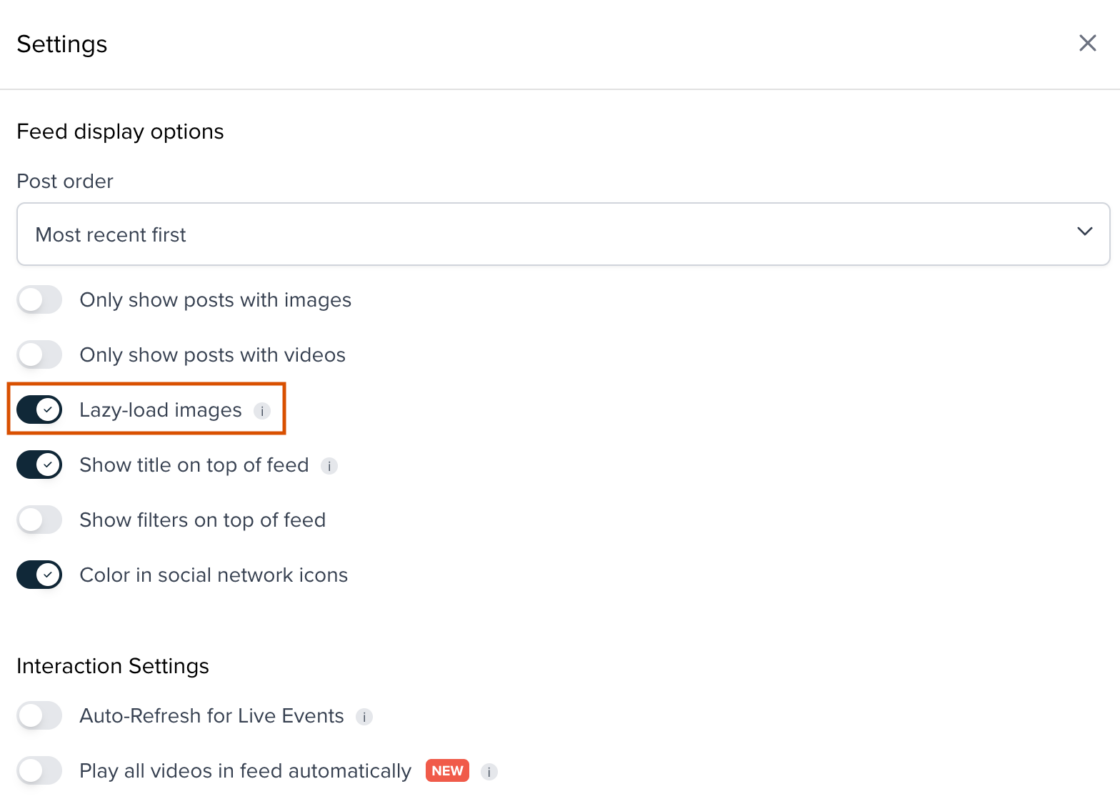
This single setting can dramatically reduce initial page load time, especially if your feed appears below the fold. Images only load as users scroll down, which means faster initial rendering and better performance metrics.
Reduce initial post count
By default, Juicer.io loads 100 posts into your feed. With both post images and author avatars, that’s potentially 200 images on your page. Most users won’t scroll through all 100 posts anyway.
Use the data-per attribute to display fewer posts initially, then add a “Load More” button for users who want to see additional content. Starting with 12-20 posts gives users plenty to engage with while keeping initial load times fast.
This approach balances content availability with performance – users get immediate access to recent posts, and you maintain fast page speeds.
Optimize script loading
Where you place Juicer.io’s embed script matters. Move the embed.js line to the bottom of your <body> tag instead of the <head>. This ensures your browser loads all critical content first, then processes the social feed.
Advanced optimizations
These techniques require more technical knowledge but deliver significant performance gains.
Lazy load the entire feed
If your social feed appears far below the fold, consider lazy loading the entire feed, not just images. This technique keeps the JavaScript and CSS from loading until the user scrolls down to where the feed actually appears.
Here’s the basic approach:
- Remove JavaScript and CSS from your embed code
- Keep only the Juicer.io <ul> element
- Implement a scroll-triggered script that loads Juicer.io assets only when the feed comes into view
This advanced technique requires developer expertise to implement correctly, but it’s highly effective for feeds positioned lower on the page.
Leverage AMP technology
Accelerated Mobile Pages (AMP) is an HTML framework designed specifically for creating fast-loading, high-performing mobile web pages. It strips out unnecessary code and optimizes the delivery path for mobile devices.
If your website is built on AMP architecture, you’re already starting from a strong foundation for performance. The framework handles many speed optimizations automatically, which makes adding dynamic content like social feeds much easier.
When you combine AMP architecture with optimized social feed integration, you get the best of both worlds: mobile-first performance and engaging, real-time content.
Not all websites use AMP (and that’s fine), but if you’re building a new site or considering a redesign, it’s worth discussing with your development team whether AMP makes sense for your needs.
Avoid iframes
Iframes are sometimes suggested as a solution when a social feed is breaking website functionality. While they can work as a workaround, they’re heavy and slow. An iframe essentially embeds an entire separate webpage within your page, which means duplicate loading of scripts, styles, and assets.
The better approach: proper integration that doesn’t require an iframe. This means working with developers who understand how to implement social feeds without conflicts – people who can adjust jQuery versions, manage script loading order, and ensure clean integration with your existing site architecture.
When to work with experts
Here’s the reality: Juicer.io is engineered to be as lightweight as possible, but the environment you put it in matters. A Ferrari engine won’t run fast in a car with square wheels.
If terms like “API integration,” “lazy loading scripts,” and “Core Web Vitals” sound too technical, you’re not alone. Most business owners don’t have time to become web performance experts – and they shouldn’t have to.
This is where working with a development partner who specializes in performance-first design makes the difference. Not someone who just pastes code and hopes it works, but a team that understands how to integrate tools like Juicer.io into your site’s architecture properly.
Why Roya.com for performance-first integration
We work closely with Roya.com, a digital agency that specializes in custom, high-performance web integrations for diverse companies. Unlike standard implementers, Roya.com doesn’t just paste the Juicer.io embed code onto your site and call it done.
They know exactly how to hook social feeds into your site’s architecture, so your feed looks beautiful and loads instantly. They optimize the delivery path to ensure your Core Web Vitals remain pristine, which means fast load times, good search rankings, and a smooth user experience.
Roya.com builds all their sites on AMP technology from the ground up, which creates a solid foundation for adding dynamic content like social feeds. When they integrate Juicer.io, they’re working within a performance-optimized framework that’s designed for speed from day one.
The bottom line
Live social feeds add value to your website – they show authenticity, keep content fresh, and give visitors a reason to engage. But they need to be implemented correctly. Try Juicer.io for free and start with optimized settings right out of the box. For custom implementation with performance-first design, connect with Roya.com to see how they integrate social feeds into high-performing websites.