
![How to Embed Facebook Feed in WordPress Website [Full Guide]](https://wpengineprod.juicer.io/wp-content/uploads/How-to-Embed-a-Facebook-Feed-in-WordPress-Website-Full-Guide.png)
To import Facebook posts into WordPress connect your Facebook account to Juicer, add your Facebook Page, install the Juicer WordPress plugin, then paste the embed code into your site. This creates a live, auto-updating Facebook feed on any WordPress page or post. No coding required.
This guide walks through each step in detail, from setting up your free Juicer account to customizing your feed’s design once it’s live on your site.
Why Feature Your Facebook Posts and Feed on Your WordPress Website?
Adding a WordPress Facebook feed to your site connects your website to the activity already happening on your social channels. Here’s why so many site owners choose to embed a Facebook feed into WordPress:
- Keeps your website content fresh and engaging: live feed updates automatically every time you post on Facebook, so your site never looks stale.
- Encourages website visitors to connect with your Facebook page: Showing real posts and engagement gives visitors a reason to follow you directly from your site. By clicking through, you’ll probably get more followers.
- Can improve your website’s SEO performance: Search engines favor fresh content, and a Facebook feed plugin for WordPress makes that easy without writing a new blog post every week.
- Builds social proof: Real comments, likes, and shares act as live testimonials, showing visitors that other people are already engaging with your brand.
- Saves you content creation time: Instead of writing new copy for every page, you can repurpose posts you’ve already published on Facebook to fill out your site.
Whether you run a small business, a nonprofit, or an events page, a WP Facebook feed is a simple way to import Facebook posts into WordPress and keep your site feeling active.
Can you add a Facebook feed to WordPress without a plugin?
Yes, it’s technically possible to embed a Facebook feed into WordPress without a plugin, using Facebook’s native Page Plugin embed code or a custom iframe. You can grab this code from Facebook’s developer tools, drop it into a Custom HTML block, and it will display your posts.
In practice, though, this no-code-from-scratch approach comes with real tradeoffs:
- You’re stuck with Facebook’s default styling. The native embed is rigid: limited sizing options, no way to match your site’s colors or fonts, and no control over which posts show up.
- It breaks more often than people expect. Facebook regularly updates its API and embed behavior. A hand-pasted iframe can silently stop working, and you won’t know until a visitor (or you) notices a blank box where your feed should be. (more on this a little later)
- There’s no moderation. Every public post pulls in automatically, including ones you’d rather not feature, with no way to filter or hide individual posts.
- It doesn’t combine sources. If you want Facebook alongside Instagram, LinkedIn, or TikTok in one feed, native embeds can’t do that… you’d need a separate block for each network.
This is where a Facebook feed plugin for WordPress like Juicer comes in. Instead of managing raw embed code yourself, Juicer handles the connection to Facebook’s API on the backend, so your feed keeps working even when Facebook changes things behind the scenes.
Some other added benefits with Juicer: personalized design options, content moderation tools, multi-network feeds (ie. Instagram, LinkedIn, TikTok and more), and one-time setup.
So while a no-plugin approach is possible for a quick, bare-bones embed, most WordPress site owners find that a dedicated Facebook feed plugin is the more reliable way to import Facebook posts into WordPress without ongoing maintenance.
How to Import and Embed a Facebook Feed in WordPress with Juicer
Adding a Facebook post to your site is just the start with Juicer… create an aesthetic social wall that will both engage users on your WordPress website and encourage them to interact with your social channels.
1. Create Your Free Juicer Account
Sign up to Juicer and try our free account to get started. Juicer is a social media aggregator that unifies 15+ platforms (Facebook, Instagram, TikTok, YouTube, X, LinkedIn, and more) into one embeddable feed you can drop into WordPress with no code, and it stays current as platform APIs change
During the free trial, you get access to advanced features like content moderation, customizable design, and multiple content updates per day… so take advantage of that.

2. Go to Your Juicer Dashboard and Select the Facebook Icon
Once you enter your account, you’ll be directed to the feeds page. This is where you can create your first WordPress social feed. In this use case, we’ll proceed with Facebook to import your posts.

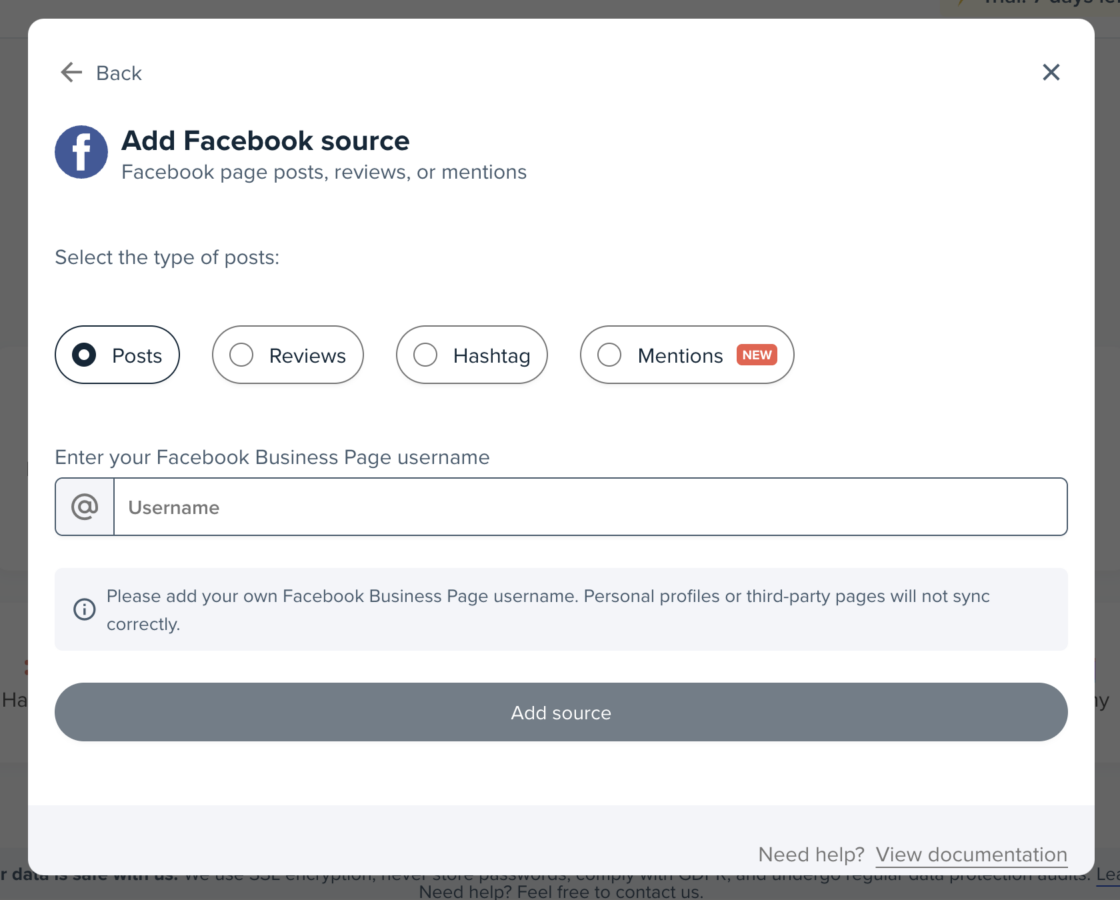
3. Add Your Facebook Page
To import content to your social feed, simply type in the name of your Facebook page. Here you also have the option to import reviews, hashtag campaign content as well as mentions
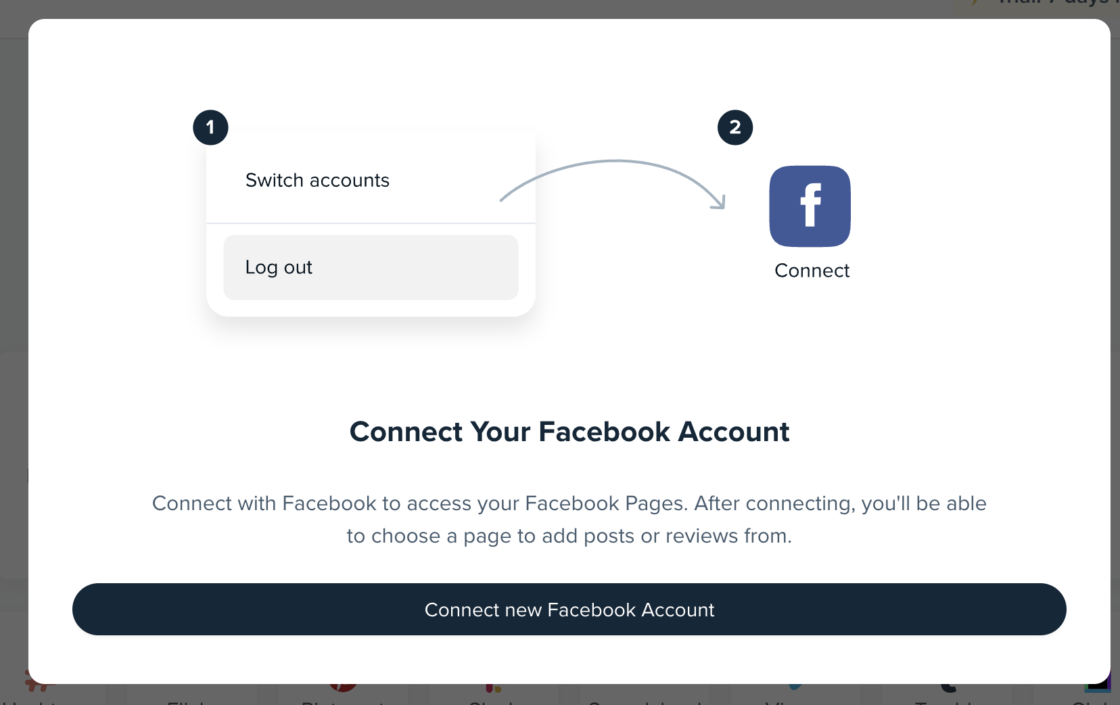
4. Connect Your Facebook Account to Juicer
After you’ve connected your page, get your Facebook login details ready.
Please note that connecting will not import personal posts to your Juicer feed; it’s just for verification purposes.
5. Open the WordPress Plugin Page and Install the Juicer Widget
After setting up your Facebook feed within the Juicer page, head to WordPress to find the Juicer WordPress plugin. Once you find it, click on “Download” and activate the plugin.

6. Go back to Your Juicer Dashboard
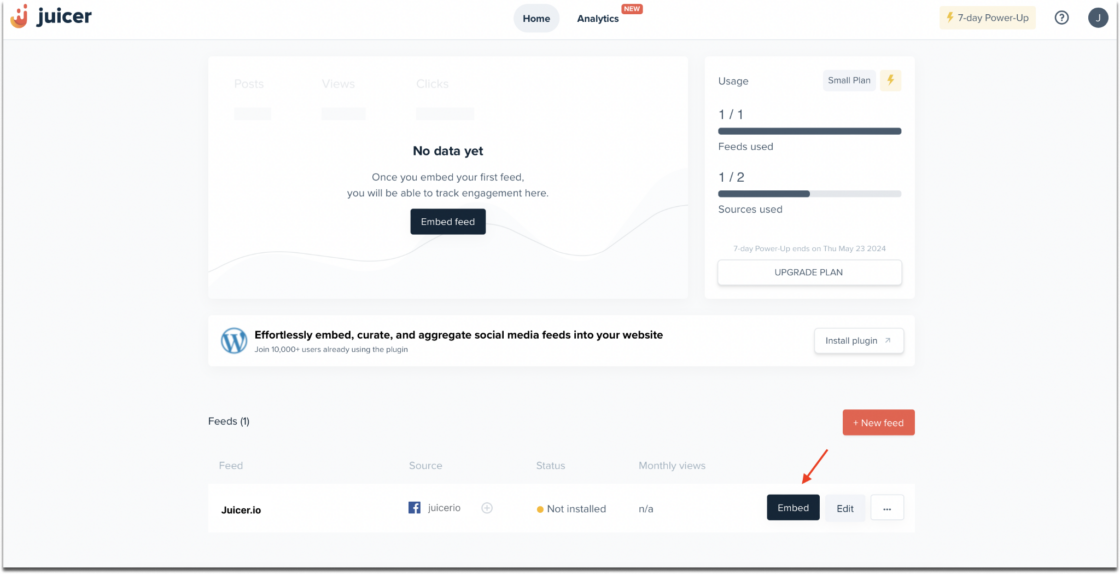
To import Facebook content on your WordPress page, go back to your Juicer dashboard and click the “Embed” button on the right side of your feed.
7. Copy the WordPress Embed Code
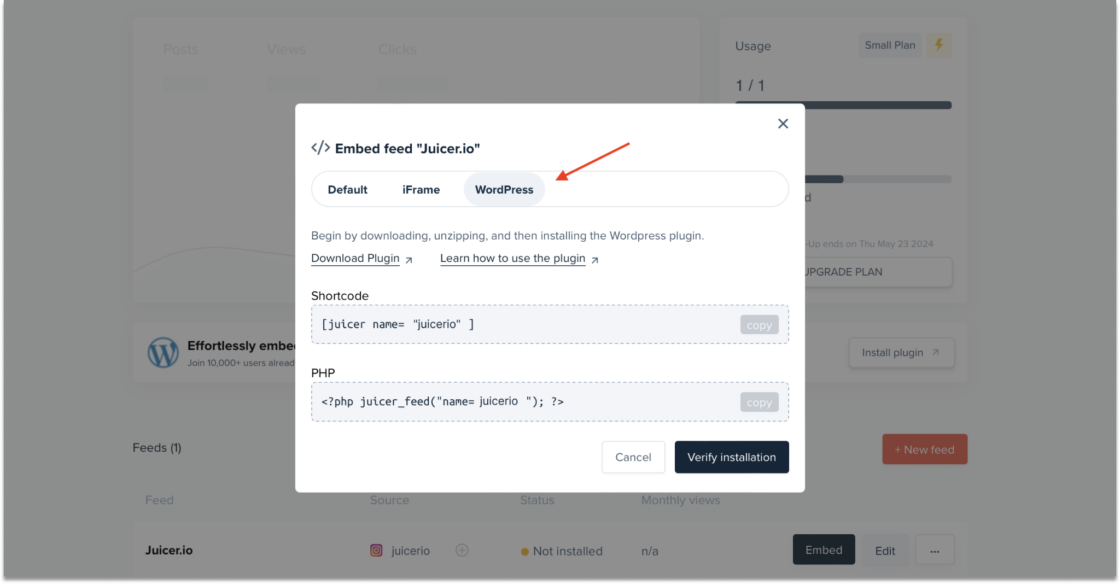
After clicking on “Embed,” a pop-up window will appear. Here, you’ll find three available embed codes; choose “WordPress” to add your Facebook feed to your WordPress page.
8. Insert the WordPress Embed Code
Copy the WordPress code (the Shortcode or the PHP code) and paste it into WordPress. Then, follow the steps in our technical documentation to add the embed code to your WordPress backend.
Why Facebook’s API Changes Break DIY Embeds and How an Aggregator Keeps Your Feed Live
Facebook regularly updates its API… tightening permissions, deprecating endpoints, changing how data can be requested. A hand-coded embed has no way to adapt to these changes.
When Facebook ships an update, the embed code that worked yesterday can simply stop pulling data. You’re left with a blank box on your site, no more imported posts, often without realizing it until a visitor (or you) notices.
A maintained Facebook feed plugin for WordPress like Juicer solves this: when Facebook changes something, Juicer updates the connection on the backend, no action needed. That’s the core advantage of a Facebook aggregator over a DIY embed: a WP Facebook feed that stays live through every API change, instead of one you have to constantly monitor and rebuild yourself.
Why Use Juicer to Embed Facebook Feed to WordPress Site?
Juicer makes it easy to embed Facebook feeds and import posts into WordPress without writing a line of code. Here’s what you get:
- No technical skills needed
- Click-to-apply themes
- Custom CSS support
- Automatic spam filtering
- Duplicate post detection
- Easy-to-navigate dashboard
Set it up once, and Juicer keeps your feed fresh, filtered, and on-brand from there. Get started with a free account.
Embed Facebook Feed to WordPress FAQs
Find answers to common questions about adding a Facebook social wall to your WordPress website.
What is a Facebook WordPress Feed?
A Facebook WordPress Feed aggregates posts from your Facebook account and displays them on your WordPress website. This allows you to showcase your latest social media activity directly on your site, keeping your content fresh and encouraging visitors to connect with your Facebook page.
How Do I Add Social Media Feeds to WordPress for Free?
To add free social media feeds to your WordPress site, follow these steps:
- Sign up for a free Juicer account.
- Connect your social media accounts to Juicer
- Add Juicer’s plugin to your WordPress site
- Embed your social media feed onto your WordPress site using the code provided by Juicer.
This setup allows you to display content from your social media, like Facebook, directly on your website easily and without any cost.
Can you import Facebook posts into WordPress without a plugin?
Yes, technically, using Facebook’s native Page Plugin embed code or a custom iframe dropped into a Custom HTML block. In practice this comes with tradeoffs: rigid default styling, no moderation, no way to combine other platforms, and the embed can silently stop working whenever Facebook changes its API.
How do you import a Facebook feed into WordPress?
Connect your Facebook account to Juicer, add your Facebook Page as a source, install the Juicer WordPress plugin, then copy the embed code from your Juicer dashboard and paste it into your WordPress page. The feed updates automatically from there.
Do Facebook API changes affect an embedded feed?
Yes, for a hand-coded embed. Facebook regularly updates its API, and a DIY embed has no way to adapt, so it can silently stop pulling data. A maintained feed plugin like Juicer updates the connection on the backend when Facebook changes something, so the embedded feed keeps working.