
You spend hours creating posts for Instagram, TikTok, YouTube, and LinkedIn. But when someone clicks your bio link, they land on a list of URLs. Not your content. Not your brand. Just links that go stale the moment you forget to update them.
There is a better way. A social media landing page that pulls your latest posts in automatically. It updates itself every time you publish. No manual edits, no stale links, no wasted effort.
Tools like Juicer Pages, a free social media aggregator that turns your feeds into a branded landing page, lets you build one in about five minutes. Here is how it works and why it matters.
The problem with static link-in-bio pages
Linktree and similar link-in-bio tools were a big deal when they first launched. You could finally share more than one link from your Instagram profile. But the concept has barely changed since then.
A list of links tells visitors almost nothing about who you are. They have to click around to get a feel for your work. Most of them won’t.
Here is what actually happens when someone taps your bio link today:
- They see text, not content. Your latest reel, your best video, your most popular tweet – nothing is visible. Just a menu of URLs.
- It goes stale. Launch something new and forget to update the link list? Your visitors see last month’s stuff.
- It looks like everyone else’s page. Most link-in-bio tools offer the same templates. There is nothing that says “this is my brand.”
What people actually want is to scroll through your work, get a sense of your style, and decide whether to follow or buy – all in one place. That is what a social media landing page gives them.
What is a social media landing page?
A social media landing page is a single page that aggregates your live content from multiple platforms. Instead of linking out to five profiles, you give people one URL where they can see your actual posts, photos, and videos.
It works like this: a social feed aggregator connects to your accounts on Instagram, YouTube, LinkedIn, TikTok, Facebook, and other platforms. It pulls your posts into one stream. Then it displays that stream on a page you control – with your logo, your colors, your CTA buttons, and your domain.
The page updates automatically. Post a new reel on Instagram at 9 AM, and it shows up on your landing page by itself. No copying, no pasting, no logging in to update anything.
Think of it as the difference between a restaurant menu and a restaurant window. The menu tells you what is available. The window lets you see the food, the vibe, the whole experience.
How it compares to what you might already use
- vs. Linktree or other link-in-bio tools: Shows your actual posts instead of static links. Visual, not text-based. A genuine Linktree alternative for people who want to show their work.
- vs. your website: Lighter, faster to set up, and auto-updating. No CMS, no developer needed.
- vs. a social wall: A social media wall is great for live events and conferences. A landing page is a permanent destination with branding, CTAs, and a shareable URL you use everywhere.
- vs. embedding a social feed on your website: If you already embed a social media feed on your site, a landing page gives you a standalone link for places where embedding is not an option – like your Instagram bio, email signature, or QR codes.
How to build one with Juicer pages (step by step)
Juicer Pages is a free landing page builder that connects to your social feeds and turns them into a branded page. The whole thing takes about five minutes. Here is what the end result looks like:
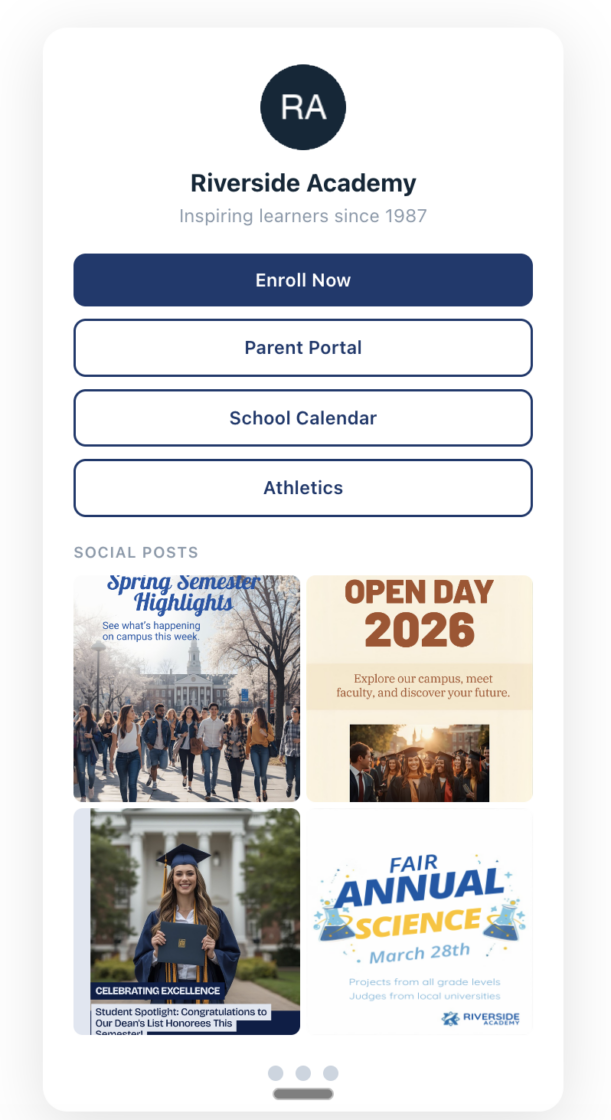
Here are the steps.
1. Sign up and connect your social accounts
Create a free account at juicer.io. Then add the social media sources you want to pull content from. Juicer works as a social media aggregator for over 15 platforms: Instagram, TikTok, YouTube, LinkedIn, Facebook, X (Twitter), Pinterest, Tumblr, Vimeo, Flickr, and more.
You can combine sources however you want. Pull your Instagram photos and your YouTube videos into one feed. Add a hashtag feed to surface user-generated content. Mix and match.
2. Create a feed and open Pages
Once your sources are connected, Juicer creates a feed – a single stream of posts from all those platforms. Head to the Pages section in your dashboard to start building your landing page on top of that feed.
3. Customize your page
This is where you make it yours:
- Colors and fonts – match your brand palette
- Profile image – upload your logo or headshot
- CTA buttons – link to your website, shop, booking page, donation page, or anything else that matters
- Social icons – add links to your profiles on Instagram, LinkedIn, TikTok, YouTube, Facebook, Twitter, and Pinterest
- Header and footer – write a short bio, add legal text, or include any extra info
Tip
Stack your CTA buttons above the feed, like Linktree does with links. Visitors see the buttons first, then scroll down to browse your content. You get the best of both worlds – clear calls to action plus a visual content showcase.
4. Publish and share your link
Every Juicer Page gets a free subdomain on juicerpages.io – something like yourname.juicerpages.io. On paid plans, you can connect your own domain.
Once it is live, share the link anywhere: Instagram bio, email signature, business cards, QR codes, ad campaigns. The page takes care of itself from there. Every new post you make on social media shows up automatically.
Who is this for? Real use cases by industry
A social media landing page works for anyone who creates content on social media and needs a single link to share. But some industries get more out of it than others.
Schools and universities
If you work in education, you already know the struggle of keeping parents and students informed across multiple social channels. A Juicer Page lets you aggregate your school’s Instagram, Facebook, and YouTube into one link you can share on the school website, in newsletters, and on printed materials.
It is one of the simplest ways to promote your school on social media without asking your communications team to manage another platform. Post to your usual channels and the landing page handles itself. And because Juicer enforces a family-friendly content policy, there is no risk of inappropriate content appearing on your page.
Restaurants and hospitality
Your best marketing is the food photos, guest experiences, and event recaps you are already posting. A social media landing page turns all of that into a single link your host can share at the door, your marketing team can put on the menu, and your guests can find through your Google Business profile.
Seasonal menus, chef spotlights, customer reviews from social media – it all flows in automatically. Learn more about social media for food and hospitality.
News and media organizations
Newsrooms, podcasters, and video creators publish across many platforms every day. A Juicer Page gives your audience one place to see everything – your latest articles shared on LinkedIn, your video reports on YouTube, your behind-the-scenes clips on Instagram, and your podcast promotions on Twitter.
It works especially well as a hub page for individual reporters or shows. Check out how media organizations use social aggregation.
Creators and freelancers
If you are a photographer, designer, or social media manager, your best portfolio is the work you already publish. A Juicer Page pulls your latest projects from Instagram, YouTube, Behance, and other platforms into one always-current portfolio. No more uploading screenshots to your website every week.
E-commerce brands
For e-commerce brands that want to increase social proof, nothing works better than real customers showing off your products. Unboxing videos, outfit photos, five-star review posts – this is the content that converts browsers into buyers. A Juicer Page lets you display user-generated content from a branded hashtag on a dedicated page. Link to it from product pages, email receipts, or your checkout flow. Fresh social proof that updates itself, no manual curation needed.
Events and conferences
Running a conference or product launch? Set up a feed that pulls posts from your event hashtag and publish it as a Juicer Page. Share the link with attendees before, during, and after the event. It works like a social media wall that lives on as a permanent page – not just a screen at the venue.
Why teams use Juicer Pages instead of another link-in-bio
Most link-in-bio tools do one thing: give you a list of clickable links. That is fine if all you need is a menu. But if your goal is converting visitors into customers, followers, or applicants, a list of links is not enough.
Here is the difference live social content makes:
- Higher engagement. People scroll through visual content. They do not scroll through a list of URLs. A page with real posts, photos, and videos keeps visitors on your page longer and gives them a reason to explore.
- Built-in social proof. A regular link-in-bio page tells people you exist. A Juicer Page shows them your latest work, your customer posts, your event recaps – proof that your brand is active and real. For e-commerce brands, this kind of live user-generated content is what moves people from browsing to buying.
- Always fresh without the work. Link-in-bio pages go stale because someone has to update them. A Juicer Page pulls your newest posts automatically. Your page from six months ago looks just as current as one you built today.
- CTAs plus content in one place. You still get the stackable buttons that link-in-bio tools are known for. But below those buttons, visitors see your actual content – giving them context before they click. That context is what turns a casual visitor into someone who takes action.
Put simply: a link-in-bio page is a directory. A Juicer Page is a storefront. One points people somewhere else. The other sells them on your brand right there.
Juicer Pages vs. Linktree vs. Building Your Own
There are three common approaches to this problem. Here is how they compare.
| Feature | Juicer Pages | Linktree | Custom build |
|---|---|---|---|
| Setup time | Under 5 minutes | Under 5 minutes | Days to weeks |
| Live social content | Yes – auto-updates from 15+ platforms | No – static links only | Requires API work per platform |
| Social feed aggregator built in | Yes | No | You build it yourself |
| Custom domain | Yes (paid plans) | Yes (paid plans) | Yes |
| Brand customization | Full – colors, fonts, images | Limited templates | Unlimited |
| CTA buttons | Yes – stackable like Linktree | Yes – core feature | Whatever you build |
| UGC and hashtag feeds | Yes – with moderation | No | Complex to build |
| Content moderation | Yes – family-friendly policy enforced | N/A (no social content) | You build it yourself |
| Ongoing maintenance | None – content updates itself | Manual link updates | Ongoing dev work |
| Cost | Free tier included | Free tier included | Developer costs |
Linktree is solid for what it does – a simple list of links. But it was never built to show your content. If you want visitors to actually see your work before they click, a static list falls short.
Building your own page gives you total control, but it means dealing with API integrations for every platform, handling rate limits, and maintaining the whole thing over time. For most teams, that is not where you want to spend your energy.
The best bio link page is not a list of links. It is a window into your brand, powered by the content you are already making.
Juicer Pages sits in the middle: the speed and simplicity of a link-in-bio tool, but with the visual impact of a custom page. Powered by a social media aggregator that does the work for you.
Getting started
Quick version:
- Sign up for Juicer (free) at juicer.io/sign-up
- Connect your social accounts – Instagram, TikTok, YouTube, LinkedIn, Facebook, or any of the 15+ platforms
- Create a feed from your connected sources
- Go to Pages and build your landing page
- Customize – colors, fonts, logo, CTA buttons, social links
- Publish and share your juicerpages.io link everywhere
The free plan gives you one page on a juicerpages.io subdomain. If you want a custom domain or more pages, paid plans start with Juicer Starter.
The whole process takes under five minutes. And once it is live, you never have to touch it again.
Frequently Asked Questions
A social media landing page is a single web page that automatically pulls in your latest posts from platforms like Instagram, TikTok, YouTube, and LinkedIn. Unlike a static link-in-bio page, it shows your actual content – photos, videos, and stories – and updates itself every time you post. Think of it as a living portfolio powered by a social media aggregator.
Yes. Juicer Pages is free to start and works as a Linktree alternative that shows your actual social content instead of a list of links. You get a free juicerpages.io subdomain, full brand customization, CTA buttons, and a live social feed – all included in Juicer’s free plan.
Juicer supports over 15 platforms including Instagram, TikTok, YouTube, LinkedIn, Facebook, X (Twitter), Pinterest, Tumblr, Vimeo, Flickr, and more. You can combine multiple platforms into one feed that displays on your page.
Every page gets a free juicerpages.io subdomain. On paid plans, you can connect your own custom domain for a fully branded URL.
A social wall is built for live events – showing hashtag feeds on screens at conferences and trade shows. A social media landing page is a permanent, branded page with CTA buttons, custom design, and a shareable URL. Juicer offers both: embed a social wall on your website for events, or create a standalone landing page with Juicer Pages.
Yes. Schools and universities use Juicer Pages to aggregate their social content into one link for parents, students, and prospective families. Juicer enforces a family-friendly content policy, so adult content is never allowed on the platform.
Create a Juicer feed that pulls posts from a branded hashtag or mentions of your account. Publish it as a Juicer Page. Customer photos, reviews, and videos show up automatically. You can moderate posts before they appear to keep things on-brand.
No. Juicer Pages is a no-code tool. You pick your feed, customize the design with a visual editor, and hit publish. No HTML, no CSS, no developers needed.